Hi, I updated the menu on a site recently. In cornerstone, it all looks good, but on an actual mobile, it is still showing the old menu, instead of the new. I can’t seem to figure out why. https://fawcettselmcreekranch.com/
Hi Kensie,
Thanks for reaching out.
What do you mean the old menu? I checked and compared the view on desktop and mobile and the menu items are the same. Or are you referring to the menu design? Please provide a screenshot of what you’re getting.
Thanks!
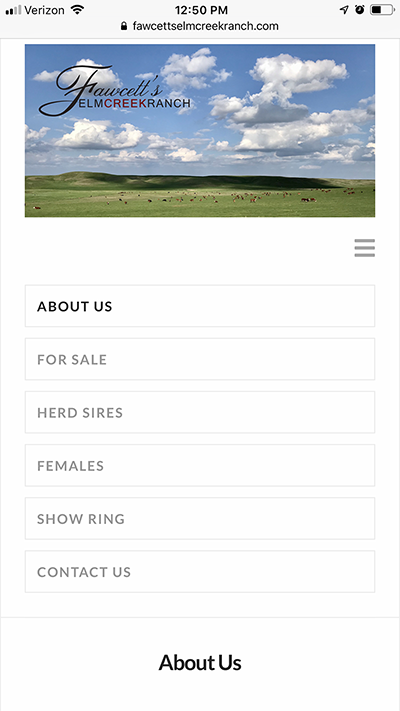
So instead of showing the link for the Herd Sires/Semen Sales (like the desktop shows), it is showing the old link for the Herd Sires. When you click on that, it takes you to the old page. I tried deleting that page and it still did it. I tried refreshing my browser and it still did it.
Hello Kensei,
I have checked your site and I can confirmed that there is a different menu loaded in smaller screen. This could be a caching issue. Please provide us access to your site so that we can investigate further. Meanwhile, can you please update to the latest versions? Our latest versions are:
- X theme 6.4.6
- Cornerstone 3.4.6
This latest release contains fixes for several issues so be sure to check out the changelog (http://theme.co/changelog/).
_After doing the updates, always remember to clear all caches (if you are using WP Rocket, WP SuperCache or W3 Total Cache) when updating so that the code from the latest release is always in use. This will help you to avoid any potential errors.-
Please let us know how it goes.
removed by x staff
Hello Kensei,
I have logged in and flush your GoDaddy cache. When I test your site again, it is now displaying the correct links.
Clear your browser cache first or use incognito mode when testing your site.
Please let us know how it goes.
This topic was automatically closed 10 days after the last reply. New replies are no longer allowed.