Hello, the mobile menu is not displaying on my homepage at www.JamaicaMobility.com. I’ve read the other posts and tried all of the suggestions such as clearing cache, disabling plugins etc and nothing has worked. The menu works fine on all other pages. Please advise. Credentials sent in secure message.
Thanks for writing to us.
Seems some of the custom codes are making the collapsed menu invisible.
We really don’t offer any support to the custom codes, still I would like to point out the cause of the issue.
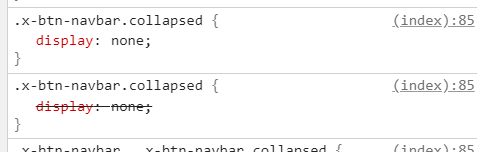
You need to remove the custom code from the specific page CSS section.

Please note that we do not provide support for custom codes that means we can’t fix it in case it conflicts with something in your site nor will we enhance it.
Thanks
Hi, thank you for the reply but removing that code had no effect. The menu still does not display.
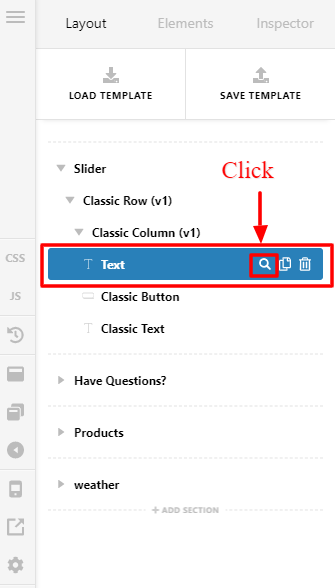
I’ve checked your website and you didn’t successfully remove the code, there is still some css code forcing your menu to hide on the mobile menu. I will guide you to where you could remove the custom css you added.
On your homepage click this element.
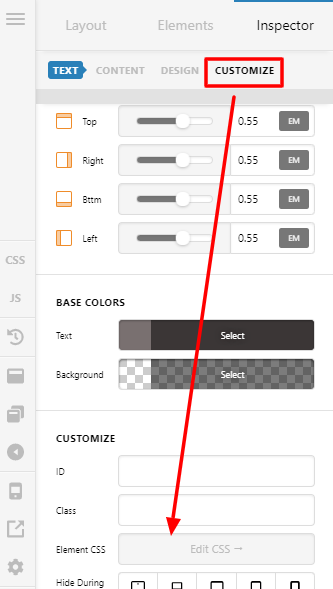
Then click the customize and go to the Edit CSS section and remove the code there and it will fix your issue.
Hope that helps.
Thank you.
That worked. Thank you guys! Great work as always!
This topic was automatically closed 10 days after the last reply. New replies are no longer allowed.