What code do I add to center the mobile menu on my phone. Right now the mobile menu is pushed to the right side below the logo.
Hi @lesliebaird
Thanks for reaching out.
I have checked your website listed in the Themeco Account and found the issue you mentioned. The Humberger menu is by default aligned center in the smaller screen devices. If might be a few other reasons which is the cause of your issue, I would like to suggest troubleshoot the following common issue to help us to recognize the reason.
1.Plugin Conflict
2.Child Theme Related issue
3.CSS/JS Customization
If you discover that an issue is coming from a custom code or 3rd party plugin, kindly consult with a developer or contact the plugin author. Please note that we do not provide support for custom codes and 3rd party plugins.
If the above points does not resolve your issue, please provide login credentials for your site in a secure note to examine it further, including:
– WordPress Site URL & Login URL
– WordPress Admin username/password
To create a secure note, click the key icon underneath any of your posts.

Alternatively, you can try the following code as a temporary solution by adding it into the Theme Options > CSS
@media (max-width: 480px)
{
    #x-btn-navbar
    {
        float: left;
        margin-left: 50%;
    }
}
Thanks
Thanks! I will try everything you suggested.
I had typed a comment before and it actually wasn’t a solution to my issue. I am working on this, still
Hello @lesliebaird,
To align the logo and mobile menu center you need to add this custom CSS under X—>Theme Options —>CSS.
@media (max-width: 480px)
{
    /*Logo center*/
.x-brand {
    display: block;
    float: none;
    line-height: 1;
    text-decoration: none;
    text-align: center;
    margin: 15px auto;
}

/* Mobile Menu center*/
.masthead .x-btn-navbar {
    display: block;
    float: none;
    width: 51px;
    margin: 15px auto;
}

}
The output would be like this
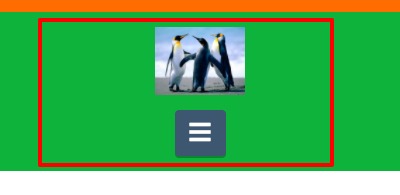
The purpose of providing the custom CSS to show you how to add CSS code to your site. Writing custom CSS is outside the scope of our theme support. If you need more customization, you need to learn CSS and learn how to use the browser’s element inspector.
Hope it helps.
Thanks
This topic was automatically closed 10 days after the last reply. New replies are no longer allowed.