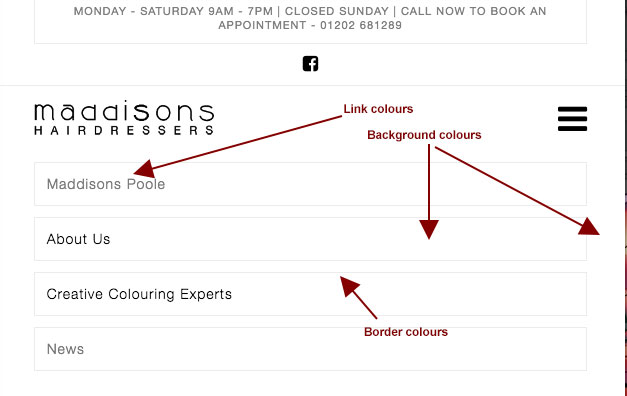
Mobile menu colours

Hi,

I am using the stack, Icon. I have searched the forum but there seems to be very little on this subject. I found one post which offered some code but this doesn’t seem to work. I’m a graphic designer, I do not write code and do not understand CSS. The most I can manage is to copy snippets and change colour codes to suit.

Basically, I would like to change the background and button/link colours in the mobile menu but it seems there is no way to do this within the editor?

Any help would be much appreciated :blush:

Hi Wayne,

Thank you for writing in, please use the custom CSS below to change the mobile menu’s toggle color. Please add this to Theme Option > CSS

@media (max-width: 979px) {
	.x-btn-navbar.collapsed,
	.x-btn-navbar.collapsed:hover {
		color: red;
	}
	.x-btn-navbar:hover {
		color: blue;
	}
}

The size can be adjusted under Theme Options > Header > Mobile Button


Hope it helps,
Cheers!

Hi Friech

Thank you for you response. The snippet you provided is only for the mobile button. It’s not the mobile button I am looking to change as I already have the snippet of code for that. I would like to change the colours and maybe size of the actual (drop down) menu links and background colours. See screen shot.

Hi There,

Please try with this custom CSS instead:

.x-navbar .mobile .x-nav li>a {
    color: #f00;
    background: #f0f0f0;
    border-color: #000;
}
.x-navbar .mobile .x-nav .current-menu-item > a {
    color: #8c1919;
}

Hope it helps :slight_smile:

Ah ha! That works great! Thank you very much for you quick reply and solution. Have a good week!

On behalf with @thai, you’re most welcome!

This topic was automatically closed 10 days after the last reply. New replies are no longer allowed.