Mobile display issues

Hi

I am having various issues with this page:

  1. The audio files do not play on my iPhone nor iPad

Mobile display:

  1. the header is really thick
  2. the navigation button looks weird
  3. the main text is too small
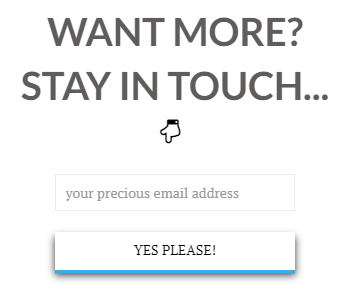
  4. is there a way to display the whole of the sign up form text?

thank you so much

…actually i have sorted out the audio issue!

Hello @Giusi_P,

Thanks for asking. :slight_smile:

  1. Can you please elaborate the header thickness issue? I checked the website on my end and seems fine.
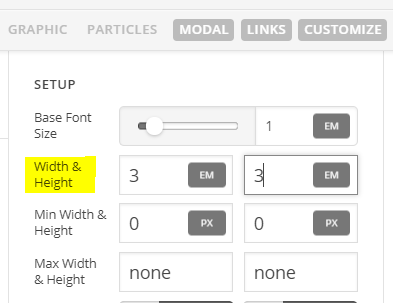
  2. Please change the width from 2.5em to 3.5em under Setup > Width and Height. https://cl.ly/3h1n1m021b34
  3. If you are referring the subheading under logo, then you need to adjust the image as text is coming from logo image. Please confirm.
  4. Please elaborate your question.

Couple of questions you have asked, we need more details to help you further.

Thanks.

Hi Prasant,

sorry for the lack of clarity…

  1. it is now fine
  2. the navigation button is now ok for mobile devices but very small when displaying on my laptop?
  3. I mean the main body text…
  4. I mean the email form where people can sign up to stay in touch… on laptop ‘your precious email address’ is readable but on a mobile it is cut off

Thank you so much!

Little update:

1.it is now fine
2.the navigation button is now ok for mobile devices but very small when displaying on my laptop?
3. it it now fine
4. I mean the email form where people can sign up to stay in touch… on laptop ‘your precious email address’ is readable but on a mobile it is cut off

Hi again,

#2. In header builder, inspect your navgation button and change the width and height of the toggle button (see screenshot)

#4. I checked your form field in different resolutions but I see the line ‘Your precious email address’ correctly and it is not cutting off in any screen resolution I tried (see screenshot)

However you can add the following code in in the Theme Options > CSS to fix this issue:

@media screen and (max-width: 767px) {
  .tco-section {
    padding: 45px 0 !important;
  } 
}

Hope this helps!

This topic was automatically closed 10 days after the last reply. New replies are no longer allowed.