Missing Updated / Author information again

Hello, a few days ago I opened a discussion here and one of the things you guys helped me with was moving the information in regards with when the post was updated/ author to the top of the post.

There was another issue after that with the white space appearing just under the header and you guys fixed that too.
I now realise that after fixing the second issue the ‘updated/author’ information disappeared completely.
I still see the code for it in the functions.php file though, but maybe something in the code you put to get rid of the white space is now somehow hiding that info?

The topic has then been closed by the staff as solved, so I couldn’t answer in the same thread and have to start this new one :frowning:

Can you guys reopen it and/or answer here? I have no idea why that information went missing completely from my posts all of the sudden. My login credentials can be found in that previous thread: https://theme.co/apex/forum/t/changing-or-removing-mailchimp-forms-and-gdpr-question/30195/4

Thanks a lot.
Best regards, Jurga
Hey Jurga,

The topic was closed because the support staff thought you have nothing to add on to. Also, the discussion has drifted away from the the original topic which is one of the causes of confusion so I’d recommend we continue here and if you have additional questions in the future, please post a separate thread for each topic.

@Alaa modified the code to show the “updated/author” info. It looks like someone has modified it so it does not show anymore. I’ve edited it back to the version @Alaa made.

Please also note that the code we provide here serves only as a guide, fixing issues that would arise from the use of it and further enhancements are outside the scope of our support. For that, you will need to contact a third party developer to continue with the development.

Thanks.

Hi Christian and thanks a lot for looking into this again.

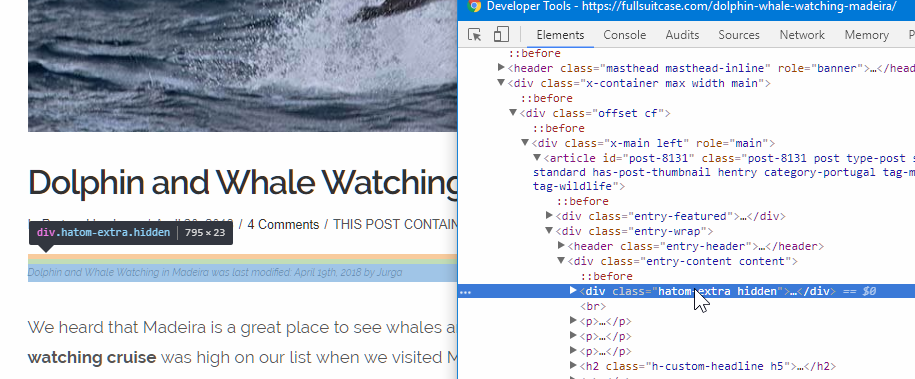
I see that you changed the code to the way it was before and now the updated/author info is showing. However, just as last week, this change made a white gap appear under the header line site-wide. So somehow these two are related. It’s by fixing the gap that the updated/author information disappears and by fixing the code for it, the gap appears again.
Any ideas how to keep the author/updated info AND not have the white gap under the header?

I really appreciate your help!
Best regards, Jurga

Hi There,

I’ve removed the <br> tag in your custom code.

Could you please try adding this custom CSS under X > Theme Options > CSS?

.hidden {display: none !important;}

Let us know how it goes!

Thank you. If I add that code in CSS it gets rid of the space, but also the ‘updated/author’ information :frowning: So I took it out again.
The space under the header is now somewhat smaller than it was before you removed the
tag, so it looks better already, but it’s still not completely gone.
It seems that somehow the ‘updated/author’ info creates that extra space and if you remove one, the other is gone too.

I think I can live with those few pixels of white. Let’s leave it at this for now.

Thank you so much for helping me out with this. :slight_smile:

Hi JurgaR,

Instead of the previous CSS snippet, please use this one:

.home .hatom-extra.hidden {
    margin: 0;
    padding: 0;
}

I’m pretty sure this should fix this issue.

Thanks.

Worked like a charm! Thank you all SO MUCH!

You’re welcome! :slight_smile:

This topic was automatically closed 10 days after the last reply. New replies are no longer allowed.