I’m quite sure I’ve done something stupid but the sidebar is missing even when I select the “Content Left, Sidebar Right” layout. Can you help, please? Many thanks in advance.
Hi @sgchan,
Thanks for reaching out!
In order for the Content Left, Sidebar Right template to work, you need to assign the Content Layout to Content/Sidebar in the Pro > Theme Options > Layout and Design and also set the width of your content lower than 100% so that you have a space for your sidebar. For example, we set the Content width to 70% then your sidebar content has a 30% width.
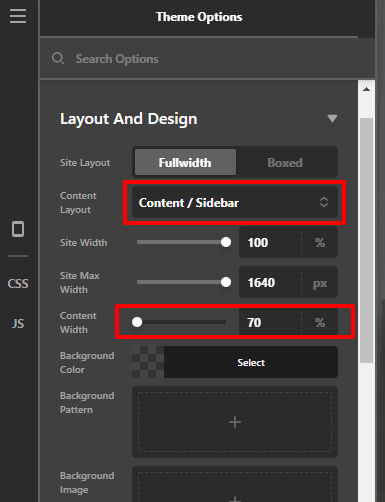
I just check your setup and I don’t see that you created a sidebar. I create a test sidebar and assign it to your tips news.

And assigned some content in the widget area.
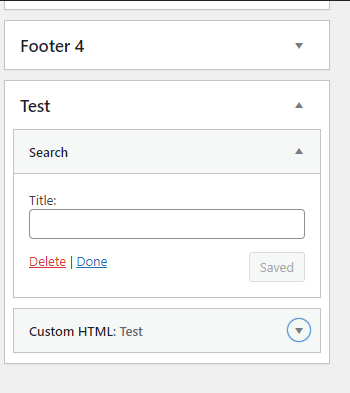
On the front-end, the layout should look like this, if you follow the stepa above.

Hope that helps.
Thank you.
Thank you so much Marc!! I knew it was something stupid I did 

Hi @sgchan,
You’re welcome and it’s our pleasure to help you! If you have any other concerns or clarifications regarding our theme features, feel free to open up a new thread.
Thank you.
This topic was automatically closed 10 days after the last reply. New replies are no longer allowed.