Minor Tweaks

  1. How can I tweak the hover bar under the main menu - currently it is green
  2. I have done something to the sidebar and not its white - I have lost the grey background - how can I get this back?
  3. Is there a way to consistently keep a gap between the main header and the content below - it is currently fine on a homepage but not consistent on the post pages

Thanks

Also - is there a way to add a ‘play’ icon on the main posts on the slider? Could it replace the ‘view post’ text or be used under it? Thanks

Hi Tony,

Kindly open up new threads for additional questions as it will help us to focus on each issue and give you a better support which you deserve. Having a long thread makes the maintaining job harder and also it will be harder for the other customers to find the correct information if they have similar issues. You are always welcomed to reply to this thread to follow up the same question.

  1. The color that is used there is the color that you set as your main website links. you can change that by going to X > Typography > Site Links:

  1. I am not sure about this one. You need to remove any CSS code that you might have added to the theme. And I am not sure where you added the grey background to be able to help on this case.

  2. The first item of the blog listing is a video and there is a problem rendering it which seems to be related to a Javascript error:

The Javascript error is produced by a library called socialize. Please disable all the 3rd party plugins or remove any additional Javascript code that you have added and test the case.

  1. I am not following which play button you are talking about. Please give us more detailed information and screenshots alongside the exact URL of the page that you are talking about.

Please consider that we are limited to provide customization as it is outside of our support scope, we will do our best to give you suggestions but for further customization, you may consider hiring a developer.

Finally, an important point that you are using an old version of the theme with the latest version of the Cornerstone plugin which is not compatible. Please update the theme to the latest version.

Hi, Thanks for your reply.

I will make sure that I open new threads in the future for questions - thanks for bringing this to my attention.

I have now sorted the colour of the sidebar which is good. The biggest issue I am still having is the videos embedded into the posts - I have played around with the aspect ratios of the videos and then the margin at the top appears but its still not consistent with the sidebar margin. Also, I noticed that its because I am using a featured image so that hides the margin until the video is clicked. Hope that makes sense - I have sent a couple of images in a private reply. Any further guidance on how to solve this would be appreciated.

In terms of the play button if you scroll to the bottom of the page you will see four videos with a ply icon which is what I would like replicating in the carousel across the top of the homepage and in the main slider - is this possible?

Thank you for your support.
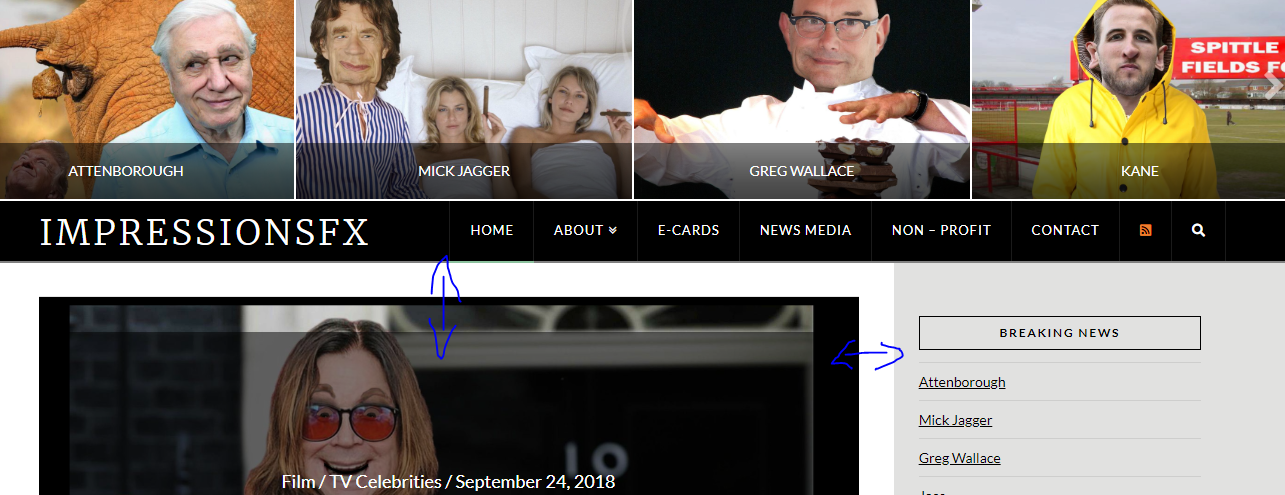
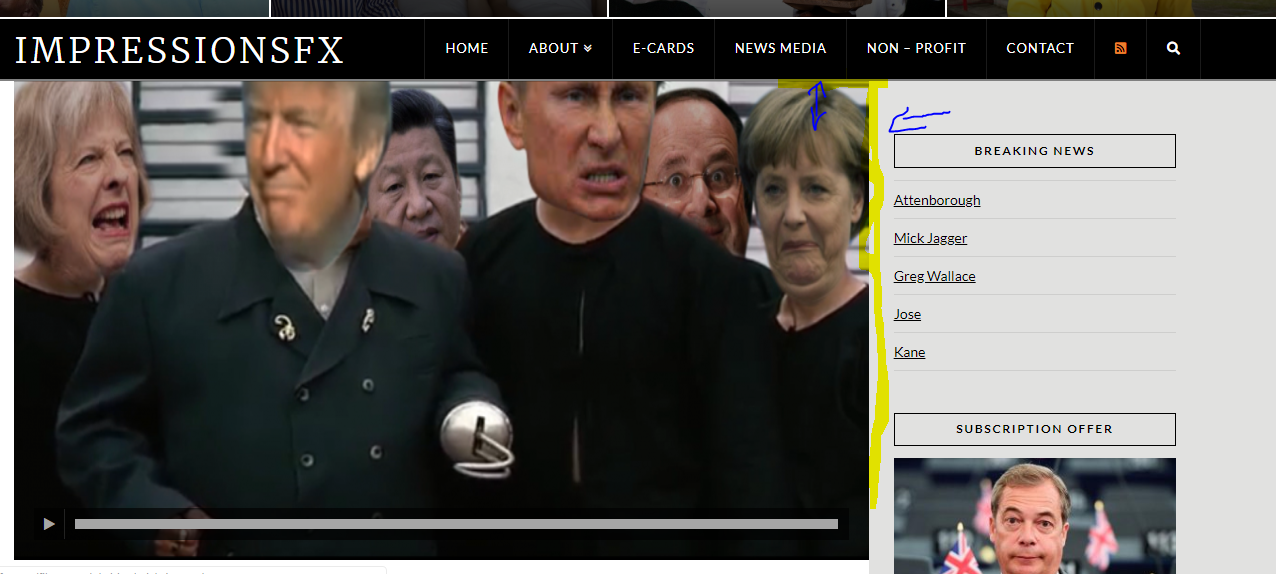
Hello There,

Thanks for updating in!

I have checked one of your posts and I could not find the video. Did you remove the video source?

And to make sure that your blog index displays the same as the single blog post, please add the following CSS code in the X > Theme Options > Global CSS (http://prntscr.com/evui3r)

.x-flexslider.x-post-slider,
.x-flexslider.x-post-slider .x-slides {
    margin-top: -35px;
    margin-right: -35px;
    overflow: visible;
}

We would loved to know if this has work for you. Thank you.

Hi, thanks for the reply. I actually need it the other way around so my single blog post displays like the index blog post. I want the white space around the videos. Thanks

Hey There,

Sorry for the confusion. Discard the custom css I gave in my previous reply and use this code instead:

.single-post .x-main.left .hentry .entry-featured {
    margin-top: 0;
    margin-right: 0;
}

And you will have this:

Hope this helps.

Thank you! Its now working as expected

You are most welcome.

This topic was automatically closed 10 days after the last reply. New replies are no longer allowed.