Menus appear all together as a bulleted list

I recently discovered that my site menus are shown all together as a bulleted list on the right side of a page.

I always keep the site plug-ins up to date, so i guess it could be an integration issue bewtween the theme and the plugin responsible for managing the menus: I have one called Menu Swapper Settings v1.1.0.2, which helps me put different menus on different pages.

All was fine and all the menus always have been shown horizontally on the top bar.
Can you please help me with this issue?

Thank you,
Enzo

Hey Enzo,

Thanks for writing in! I checked your site and I see the navigation menu correctly. However I noticed you’re using WP Rocket and this could be just the cache issue, try clearing out all the caches and check your site again.

Let us know how this goes!

Hello,

the WP Rocket plug-in is OFF and all the subpages of my site show the menus incorectly.

You can check this pages for instace:
https://medoffice.it/intro
https://medoffice.it/modulo-base/
https://medoffice.it/cartella-sanitaria/

Only the home page https://medoffice.it/ shows the menus correctly.

Can you help me finding the solution?

Thank you,
Enzo

Hi Enzo,
The fact that the menu shows correctly in one page and not in other pages shows that the problem is indeed the cache. I see that you have many layers of cache and you also have the SG Cache.

I went to X > Settings and clicked the clear style cache button and then cleared the SG cache but the problem is still there. Then I checked the front end of the page which has the problem and use the Google Chrome browser developer toolbar network panel which shows that the x-cache is enabled:
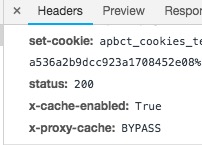
This means that the requests to your server are not handled by the web server you host your website in and you use a CDN to handle the page. If you use the Cloudflare you need to follow the steps below:

https://xthemetips.com/using-cloudflare-rocket-loader-with-x-pro-and-x5/928/

If you still have a problem please disable the Cloudflare completely and let the original server handle DNS and not the CloudFlare and test the case.

Finally, I suggest that you contact your hosting service provider and ask them to help you fix the cache problem.

Thank you for your understanding.
This topic was automatically closed 10 days after the last reply. New replies are no longer allowed.