Menu questions

Hi there, see:

1: The sub menu is being a little weird, shouldnt it drop down? its appearing above the nav bar.

2: I have a onpage menu, then a normal menu on the other pages. I have a telephone link that should be red, it is on the homepage, but isnt on the others. The menu is just duplicated then tweaked to be not a one pager, ie using a mix of pages and custom links (one page is all custom links)

Thanks.
Hi @logoglo,

Thank you for reaching out to us.

  1. This seems like the Custom CSS you’ve added is conflicting the submenus, try removing the custom CSS first and see if this resolves the issue.

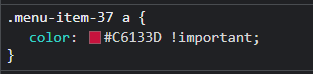
  2. The color you’ve added to the menu item is with Custom CSS using the menu item Id (see screenshot) since you’re using two different menus, you need to use the new ID of the menu item for the duplicated navigation menu for consistency.

image

Hope this helps!

Thanks, I got rid of any css to test, and the menu is still behaving like this.

Issue #2 has been fixed, thanks.

Hello @logoglo,

For your query number 1

It seems that you have added custom CSS code for the submenu or header settings is not correct.

To get a quick fix you can use this custom CSS code under X–>Theme Option -->CSS

.x-navbar .desktop .x-nav > li ul {
    top: calc(100px - 15px);
}

OR

You need to check your custom CSS code where you have added the custom CSS for the submenu.

The purpose of providing the custom CSS to show you how to add CSS code to your site. Writing custom CSS is outside the scope of our theme support. If you need more customization, you need to learn CSS and learn how to use the browser’s element inspector.

Hope it helps.
Thanks

Strange. I havnt added code for the submenu…but adding your code above fixed the issue, thanks.

You are most welcome.

This topic was automatically closed 10 days after the last reply. New replies are no longer allowed.