Hi, After recent updates my menu seems to be working on Apple products, but not on PCs. Site seems to take a long time to load as well. Can you take a look?
ambiencejazz.com
Thanks,
George
Hi, After recent updates my menu seems to be working on Apple products, but not on PCs. Site seems to take a long time to load as well. Can you take a look?
ambiencejazz.com
Thanks,
George
Hi George,
I checked and can see you have w3 total cache installed.
Please try to clear your plugin cache and check again.
Then make sure to exclude cornerstone and theme js files from minification. No need to minify these files as they are already minified by defualt
wp-content/plugins/cornerstone/assets/dist/js/site/cs-body.js
wp-content/plugins/cornerstone/assets/dist/js/site/cs-head.js
wp-content/plugins/cornerstone/assets/dist-app/js/cs-vendor.js
wp-content/plugins/cornerstone/assets/dist-app/js/cs.js
wp-content/themes/x/framework/dist/js/site/x.js

Thanks
Thanks Paul. I excluded the cornerstone and theme js files from minification and cleared the cache. Doesn’t seem to have made a difference. Support had me add some js code a few years ago for a similar problem and I’m wondering if it is possibly conflicting now. Let me know the next step. thanks George
Hi George,
I see the following JavaScript errors on your console log when loading the site.
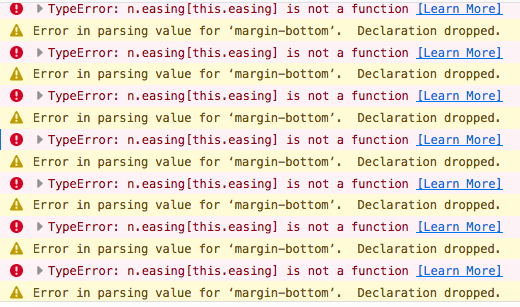
Could you please try disabling your child theme and remove any customizations that you have added to your site and re-test your issue again.
If you’re still having issues, disable all of your 3rd party plugins except Cornerstone plugin and re-test your issue further. If the issue resolved, then you can activate your plugins one by one to see which plugin causing the issue.
Thanks!
Thanks. I removed all of the previous JavaScript. The child theme wasn’t active… just X. That corrected the menu issue.
I am, however still showing a lot of errors when I look at the console. I tried deactivating all plugins but cornerstone, but didn’t seem to make a difference. Can you take a look? Thanks for your help.
Hey George,
I checked your site and those errors are coming from a YouTube API you can simply ignore those error messages however you can follow this thread here https://stackoverflow.com/questions/47833687/youtube-api-failed-to-execute-postmessage-on-domwindow if you want to get rid of those.
Hope this helps!
This topic was automatically closed 10 days after the last reply. New replies are no longer allowed.