Hi
Is it possible to change the links in the menu to look something like this?

Thanks!
Hi
Is it possible to change the links in the menu to look something like this?
Thanks!
Hi there,
Thanks for writing in!
.menu-item {
    background: #52d2cd;
    margin-right: 10px;
}

Hope this helps!
It works! Thank you so much!
I have one more questions on the subject:
Is it possible to get individual color for each link?
Best!
Christian
Hello There,
You can make use of the menu id:
.menu-item {
    background: #52d2cd;
    margin-right: 10px;
}

.menu-item-1963 {
    background: green;
}
1963 is just a sample ID. By inspecting menu item you can find the menu ID for that menu item. Right click on menu item and click inspect.
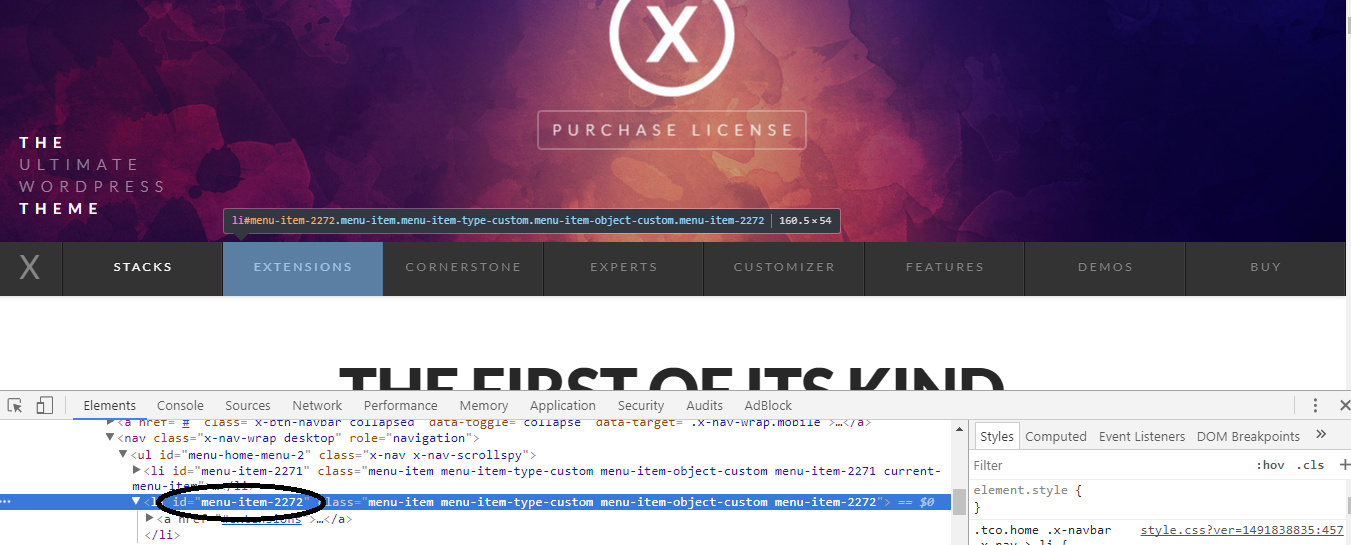
Hope this helps.
Hi again,
I have modified the background in PRO, when I add the CSS I get double backgrounds


Please change your CSS to this:
.x-menu-inline > .menu-item > a {
    background: #52d2cd;
    margin-right: 10px;
}
.x-menu-inline > .menu-item-1963 > a {
    background: green;
}
Backgrounds are now applied to the link instead of actual li element.
Thanks!
Hi again
Im sorry but nothing at all happens when I use the last CSS
Best!
Hello There,
You will have to insert the correct menu ID first before it will work. To assist you with this issue, we’ll first need you to provide us with your URL. This is to ensure that we can provide you with a tailored answer to your situation. Once you have provided us with your URL, we will be happy to assist you with everything.
Thank you.
Thank you,
My site is not accessible, ill send you my login details
Hi There,
Please try adding this custom CSS instead:
.x-menu-inline > .menu-item-26 > a.x-anchor {
    background: green;
}
.x-menu-inline > .menu-item-27 > a.x-anchor {
    background: red;
}
.x-menu-inline > .menu-item-28 > a.x-anchor {
    background: yellow;
}
.x-menu-inline > .menu-item-29 > a.x-anchor {
    background: blue;
}
.x-menu-inline > .menu-item-30 > a.x-anchor {
    background: pink;
}
.x-menu-inline > .menu-item-31 > a.x-anchor {
    background: orange;
}
.x-menu-inline > .menu-item-32 > a.x-anchor {
    background: blueviolet;
}
Hope that helps and thank you for understanding.
Thank you! This worked
Thanks!
We are glad we were able to help, you are welcome 
This topic was automatically closed 10 days after the last reply. New replies are no longer allowed.