Menu Layout Questions

I have several questions reagrding the way to layout menus in PRO:

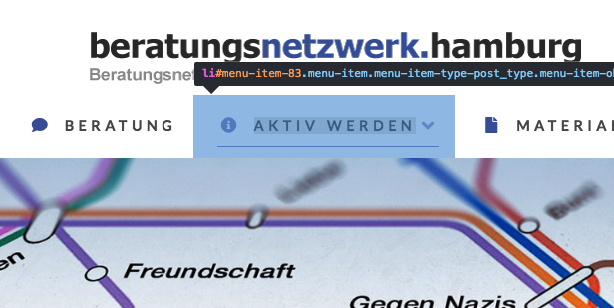
  • How can I make the Top Link underline (Primary Particle Setup) the same width like the text + icon above it? (at the moment it is too wide)
  • How can I make the Top Link underline stay after the menu item has been clicked? (So it is clear that it has been interacted with and we are on that page now)
  • How can I make it so that the Top Link underline is closer to the text and doesn’t stick to the bottom of the menu container? (more like an underline) Example
  • How can I make the blue Sub Link “box” less wide and have it centered under the Top Links?
Hi There,

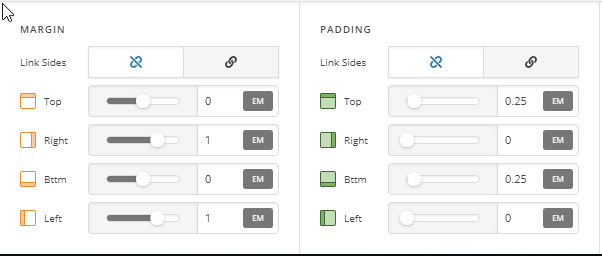
Please remove the left & right padding of Top Links then add the left & right margin instead:

Please add this custom JS under Theme Options > JS:

setInterval ( function(){ 

jQuery('.current-menu-item a').addClass('x-active');
jQuery('.current-menu-item a .x-particle').addClass('x-active');

 }, 500 );

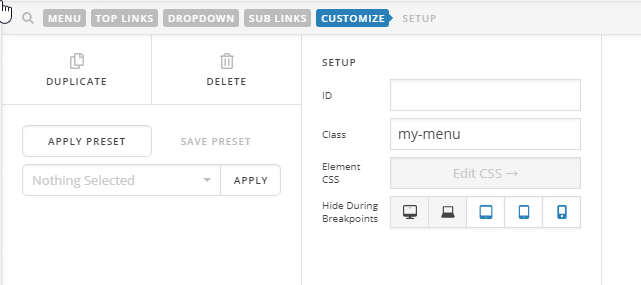
Please assign a custom my-menu class to your navigation inline element:

Then add this custom CSS:

.my-menu.x-menu > li > .x-anchor .x-anchor-particle-primary {
    top: 45px;
}

Please also add this custom CSS:

.my-menu.x-menu ul.sub-menu.x-dropdown {
    left: 50%;
    transform: translateX(-50%);
    width: 12em;
}

Hope it helps :slight_smile:

Hi,
and thanks for the quick reply!

I am running into two problems though:

  • Even with the changed settings, the underline is slighlty off to the left
  • When clicking on a menu item, the underline first goes away and only then returns to stay. Of course I want it to stay immediately after clicking the item

Hi,

I’d like to login to see your setup but you’re WordPress Admin is not available (see secure note). Please check.

Thanks.

thats strange, i just tried the link i sent you and for me it works.
could you try again?

Hello @bora-bora,

Thanks for updating the thread. :slight_smile:

Yes, the login details and website is working fine. :slight_smile:

In header builder under Customize please add following CSS along with existing one or you can replace with following:

.my-menu.x-menu > li > .x-anchor .x-anchor-particle-primary {
    top: 52px;
    left: 8px;
}

On my end it seems to be working fine. Can you please share some screencast of how you are looking to have the underline or how you are seeing at our end?

Thanks.

I checked it on Firefox and Chrome. In both browsers the underline goes away when you click on one of the menu items and then returns.
Also, in Chrome the height of the underline changes from 2px to 1 px when it reaches its full length

Hi @bora-bora,

I’m getting the same Service unavailable message, maybe it’s due to security. Perhaps you can disable the coming soon page instead?

Thanks!

Hi Rad,
i am sorry but disabling the coming soon is not an option - the project is only allowed to get onlline once everything is completely finished, or so says the client.
Could you please try again to login - your collegue prasant seems to manage to suceed without a problem.
thanks!

Hello @bora-bora,

I was able to logged in and I can see that the line is positioned at the center.
This is what I am seeing:

Please clear your browser cache or use private browsing or incognito mode and test your site again.

Hi RueNel,
thanks for the reply, but the problem with the underline not being centered was indeed already solved.
Please check the posts I did wrote after that:

I checked it on Firefox and Chrome. In both browsers the underline goes away when you click on one of the menu items and then returns.
Also, in Chrome the height of the underline changes from 2px to 1 px when it reaches its full length

Hi There,

This is Thai again. Your website is currently inaccessible right now.

Could you please contact to your hosting about this issue?

For more information, please take a look at this: https://www.lifewire.com/503-service-unavailable-explained-2622940

Thanks.

This topic was automatically closed 10 days after the last reply. New replies are no longer allowed.