Menu does not open dropdown

I have a problem with a menu in the header. The dropdown menu that contains the sublinks no longer opens.

Clicking on the Sub Links Indicator causes me to be redirected to the Top Links page.

This menu worked fine for a while, suddenly this error appeared and I currently can’t explain why.

Would be great if you guys could take a look at this.

Hi @mrdplusd,

Thanks for reaching out.
I have checked your website with and without logging in but the Drop Down menu worked perfectly fine.

With Logged In:

Without Logged In:

If you are still facing the same issue, please provide any video that helps us to recognize the problem.

Thanks

Hello Tristup,

you are right, the top menu works perfectly.

There is another header bar in this header that contains the menu that is not working. It is the bar with the white background, as seen in my screenshot above.

Thank you and best regards

Hi @mrdplusd,

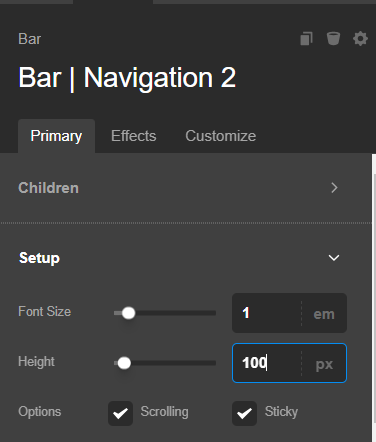
I have checked the Bar where the problem is and found that the Height is set to the Bar. And that is why the dropdown is not showing.

Screenshot 2023-06-28 164048

I would suggest you set the height to auto and adjust the spacing with Top and Bottom padding.

Hope it helps.
Thanks

Okay, thanks for pointing that out. I don’t understand why the height specification in the bar is problematic, but I did the height specification in the container inside instead.

Why is the height specification in this bar problematic. In the bar above it, which also contains the other menu, it works flawlessly.

Hello @mrdplusd,

It seems that you have set the Header as sticky, please note when you set the Header as sticky then you need to set the Bar height as Auto so that the submenu aligns properly.

Hope it helps
Thanks

This topic was automatically closed 10 days after the last reply. New replies are no longer allowed.