Hi my menu disappears for some reasons on smaller devices. Can you help me out? The site is here:
http://cdeart.com/globeacon
Thanks!
David.
Hi my menu disappears for some reasons on smaller devices. Can you help me out? The site is here:
http://cdeart.com/globeacon
Thanks!
David.
Hello David,
As we do not have access to your WordPress Dashboard we can not make sure what should be the cause of the issue. Please kindly get back to us with the User/Pass of your website to follow up the case. Meanwhile kindly follow the steps below to troubleshoot some common cases and get back to us with the result:
Thank you.
Hi just tried all the steps suggested and didn’t help. Where can I give you the user/pass details privately?
Hi,
Please see the attached image
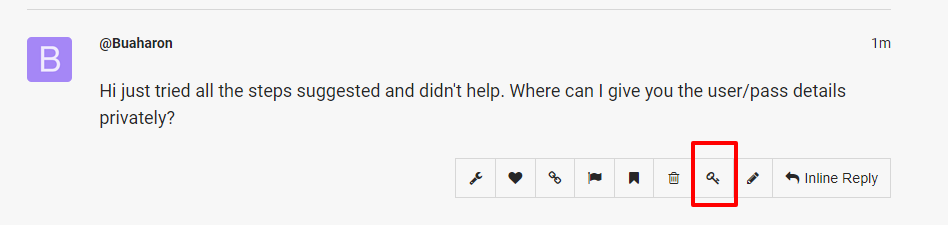
Use that icon to add secure note.
Thanks,
Done thanks!
Hi There,
Your button is actually white in a white background and that is why you cannot see it.
Please add the following code to Theme Options CSS
.x-btn-navbar.collapsed, .x-btn-navbar:hover {
      color: black;
}

.x-btn-navbar, .x-btn-navbar.collapsed:hover {
color: #02aed4;
}
Hope it helps!
This topic was automatically closed 10 days after the last reply. New replies are no longer allowed.