
My Menus don’t show over the bar and container below it.

How do I move this text to the top instead of it being on the side
Having a hard time with the images is there a best/suggested size to upload/use?
Hello @detech,
Thanks for writing in!
1.) Please edit your header and in your bar settings, make sure that the z-index of the 2nd bar is lesser than the first bar.
2.) Please click the text element and remove the vert-text in the class field which you can find in the “Customize” tab.
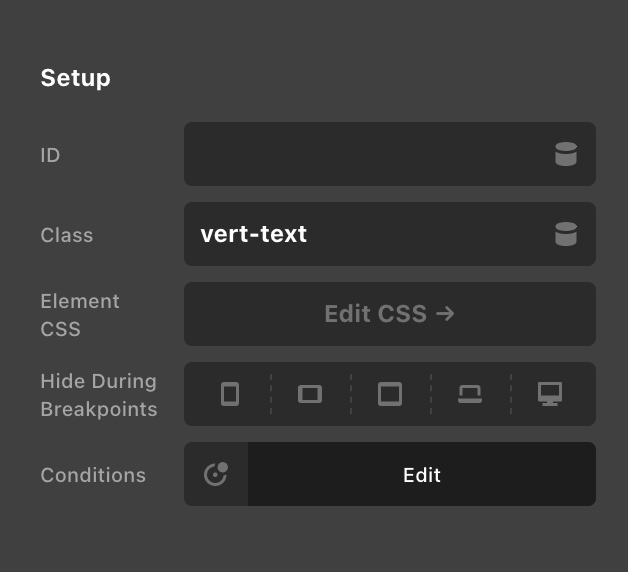
Kindly let us know how it goes.
This didn’t work and I don’t see Vert-Text anywhere. Is it possible to get the code for this header and put it inside a Container father down on the page?
Please advise how I can make the bar 2 hide on automatic when I scroll down like it does when I scroll up because its blocking my content’s top portion of that page.
Hello @detech,
The vert-text class is in the “Customize” tab of the text element settings. By the way, I could no longer find it in your header. Did you remove it already?
We have the “Hide Initially” feature in the bar settings which hides a bar and it will display the bar as you scroll the page. Disable the “Sticky” option in your bar 2 settings so that bar 2 will no longer appear as you scroll down the page.
Best Regards.
Thanks for your help I fixed it however now I notice on mobile and different resolutions the menu is cut off and pushed together can you assist on this, thanks.
Hi @detech,
You may need to create different navigation for the mobile which will be visible only on mobile devices. That can be done using the Hide During Breakpoints option under the Customize tab of the element. And vise versa, you need to make your normal navigation invisible using the same option.

Hope it helps.
Thanks
This topic was automatically closed 10 days after the last reply. New replies are no longer allowed.