Menu break line alignment

Hello, My client ask me to add an icon before each menu item, I used a plugin, but I need to add a breakline < br > so the menu doesn´t get to wide.

But when I add the < br> the second line goes under the icon, I need to be under the first line. I’ve been searching around but I can´t find how this can be fixed.
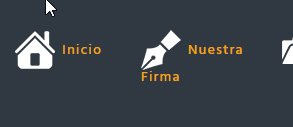
image

I’m working with X.

Hello @Creativecure,

Please try adding this code in X > Theme Options > CSS:

.x-navbar .desktop .x-nav > li > a > span {
    display: flex;
    align-items: center;
}

Kindly note that since this is a custom code that changes the default behavior/display of the theme, you will be responsible to maintain or update the code in case you require further changes or if the code stops working in future updates. If you are uncertain how to proceed, it would be best to get in touch with a developer.

Hope this helps.

Worked fine.
Thanks

We are delighted to assist you with this.

Cheers!

This topic was automatically closed 10 days after the last reply. New replies are no longer allowed.