Menu bar responsive issue

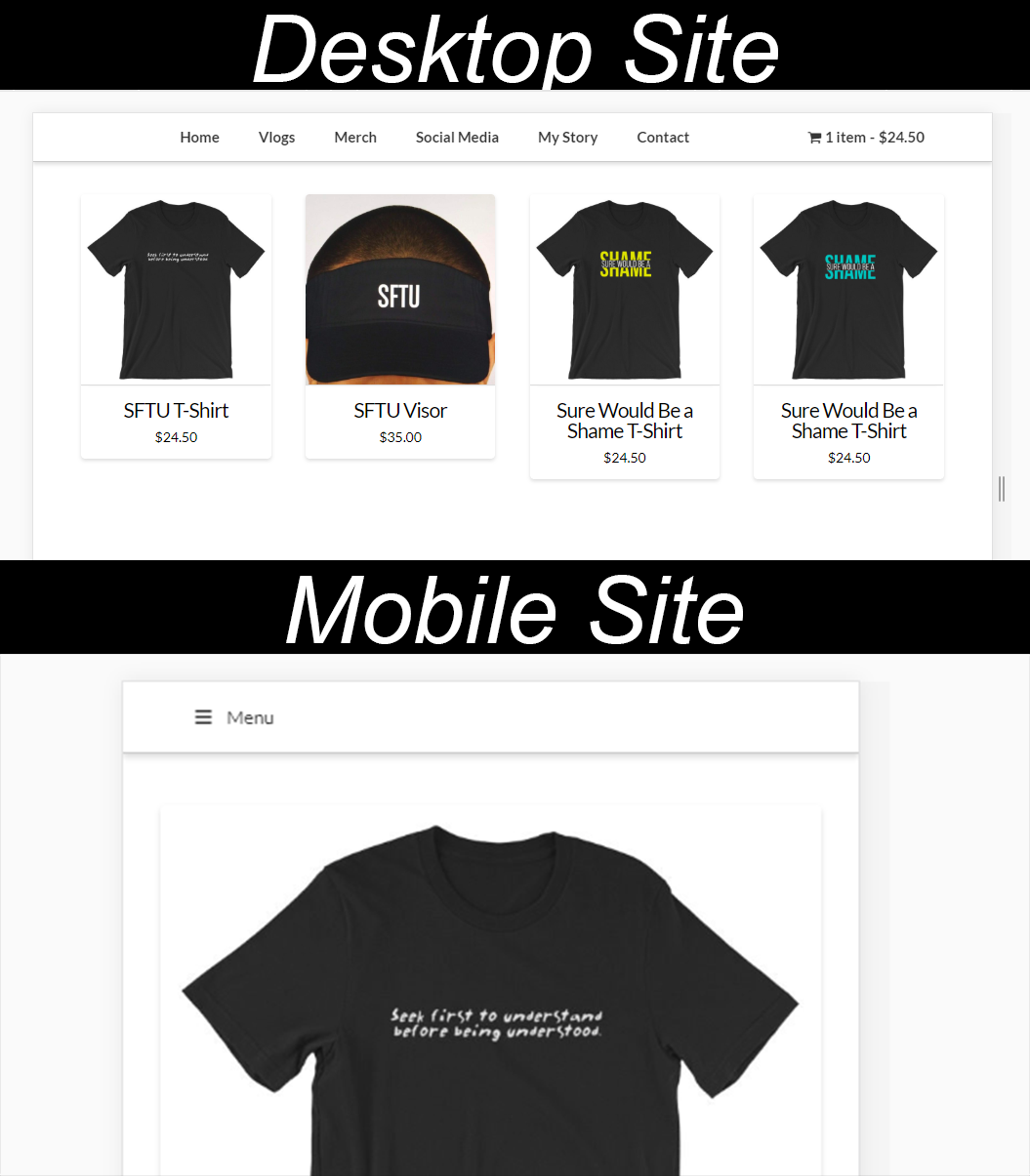
As you can see in my screenshot. I am using a woocommerce cart plugin that displays my cart in the top right corner. I am also using uber menu. When I resize my menu the menu becomes the small version (just the expandable icon) and the cart dissapears. I like that my menu is responsive but is there a way to keep the cart visible no matter the screen dimensions? thanks! (I am including my login info info in a secure note)
Hi There,

Thanks for writing in!

I checked the plugins setting didn’t find any option similar to what you want.
It sounds like you are asking about a feature of a third party plugins. Regretfully, we cannot provide support for third-party plugins as our support policy in the sidebar states due to the fact that there is simply no way to account for all of the potential variables at play when using another developer’s plugin or script. Because of this, any questions you have regarding setup, integration, or troubleshooting any piece of functionality that is not native to X will need to be directed to the original developer.

We would encourage you to please take help from a developer to do this.

Thank you for your understanding.

this isn’t a 3rd party issue. I’m sure the reason that the cart is disappearing is because ubermenu is set to collapse at a certain width. I’m sure there is some CSS that could be used to override this and have it not affected by the menu collapse?

Hi There,

Sorry, but that feature is not natively built in UberMenu. It requires more than a custom CSS to achieve what you need. Yes, we can hide the cart inside the mobile menu on mobile, but extracting it to position it outside of the menu is tricky.

What you need to do here is to have Multiple Menu Location, You need to have a left and right menu location where the left is your standard menu that collapse on mobile. and the right is the Cart menu that stays inline in mobile. Basically, you need to separate the standard menu and the cart.

We like to continue on helping you on this, but regretfully this falls outside the scope of support we can offer. You may wish to consult a developer to assist you with this. X is quite extensible with child themes, so there are plenty of possibilities.

Thanks for understanding,

This topic was automatically closed 10 days after the last reply. New replies are no longer allowed.