Is there a way to get the left edge of the drop down menu to align closer to the parent?

thanks
Is there a way to get the left edge of the drop down menu to align closer to the parent?
thanks
Hi @wbgTHEMECO,
Thank you for reaching out to us. I tried to check your site but you seem to have quite a few licenses registered on your account so I am not sure which website is in question. If you’re using X then you can align the sub menu with parent menu item by adding the following code in the Theme Options > CSS:
.masthead-inline .x-navbar .desktop .sub-menu {
    left: 0;
    right: auto;
}
If you’re using Pro then you can make use of the following code but it is not recommended because the sub menu automatically calculates the space around it and renders left and right according to the available space so adding the code below will override this behavior and sub menus will always render close to it’s parent menu item:
.x-masthead .x-menu > .menu-item > .sub-menu {
    left: 0;
    right: auto;
}
Hope this helps!
I’m using the Pro theme.
I’ve also included the URL in the secure note.
Let me know if I should still not adjust anything or if there is some way to shift it over a bit more than it currently is.
Hi @wbgTHEMECO,
You can apply a negative right margin (offset) to your menu dropdown instead.
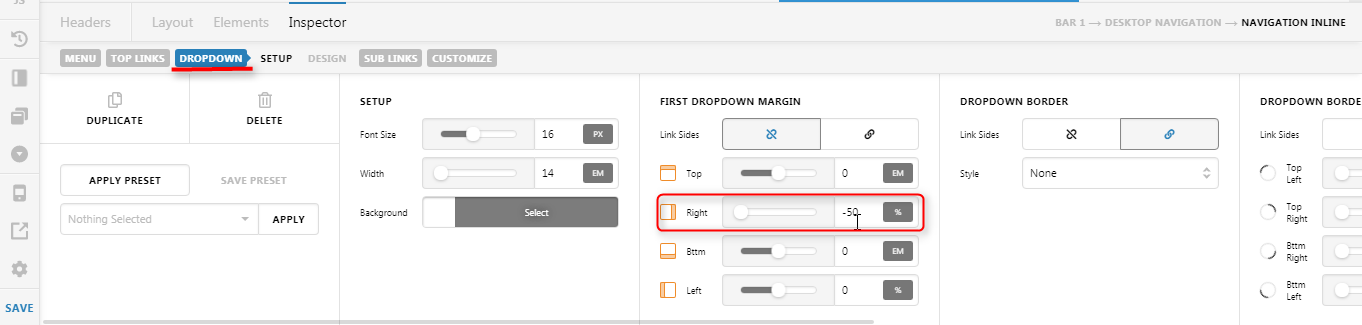
Use a percentage value so it will be responsive.
Hope it helps,
Cheers!
This topic was automatically closed 10 days after the last reply. New replies are no longer allowed.