Megamenu styling?

Hi there,

On http://csazcontent.wpengine.com/homepage-01/, I’m struggling to get the styling of the “Policy” dropdown correct. Can you tell me how I can adjust the padding so that “Achieve60” and “This describes…” sit farther away from the image?

Not sure if this is a configuration or CSS challenge.

Thank you!

Hello @jstovallcollaborativ,

Thanks for writing in! :slight_smile:

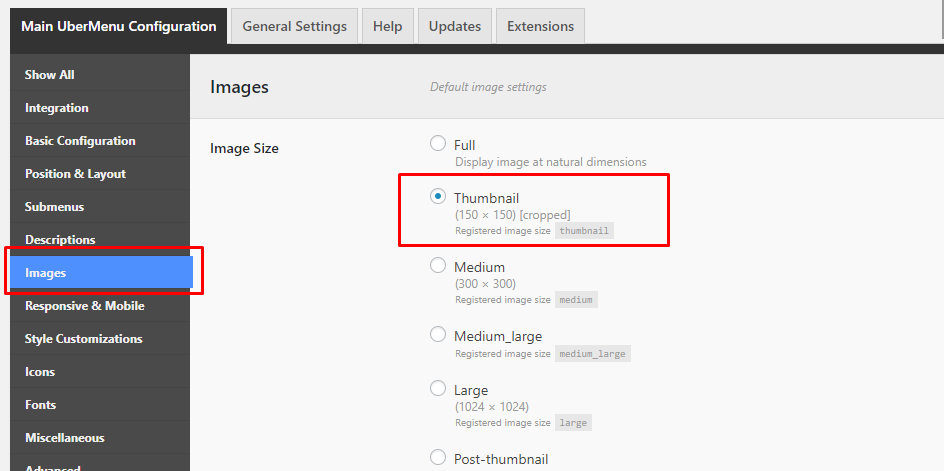
You do not need to add some CSS. Please simply go to Ubermenu > Images, then select Thumbnail size:

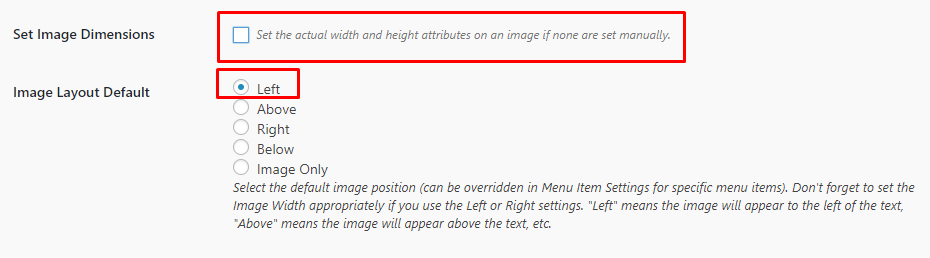
After that, uncheck the Set Image Dimensions setting and make sure Left is selected as Image Default Layout

Hope this helps.

Hey Jumar, thank you for the response…but it didn’t work!

So, I updated the global settings and tweaked the menu-specific settings, but couldn’t get a change.

I then tried to set up a fresh one, under the “Achieve60” main menu item.

Can you take another look and help me flesh out what’s going on here?

Thank you for your help!

Hi There,

You can add the following code to Theme Options CSS

.ubermenu .ubermenu-item-layout-image_left>.ubermenu-image {
    float: left;
    padding-right: 15px;
}

Hope it helps

This topic was automatically closed 10 days after the last reply. New replies are no longer allowed.