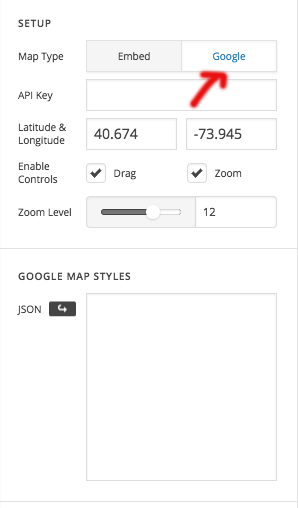
Map style (JSON) via shortcode

Hi,

I display a map and markers with a shortcode.
I need to add 180 lines of JSON style.
How do I do that? Whats the best solution I got?

[...]
        $sc = '';
        $sc .= '[google_map api_key="AIzaSyB5P-KTVBDpgnXox0frxWz7fOvTXU8w1l8" lat="48.859005" lng="2.344419" zoom="13" drag="true" zoom_control="true" no_container="true" style="margin:0; padding: 0;"]';
        $sc .= '[google_map_marker lat="48.859005" lng="2.344419" image="/wp-content/themes/pro-child/mmarkb.svg" start_open="false" info="<a href=\'#\'>TEST</a>"]';
        $sc .= '[/google_map]';
        return do_shortcode($sc);

Thanks
Hi @lijecreative,

You can use the map v2 elelment.

Thanks

Hi,

I can’t.
I’m using custom post type to display markers on a map, called with a custom shortcode.
The function of my shortcode uses the code of the first post (it’s simplified here).

Hi @lijecreative,

Regretfully this could only be possible with custom development, but this would be outside the scope of support we can offer. You may wish to consult a developer to assist you with this. X is quite extensible with child themes, so there are plenty of possibilities.

Thanks for understanding. Take care!

This topic was automatically closed 10 days after the last reply. New replies are no longer allowed.