Making text larger

Hello!

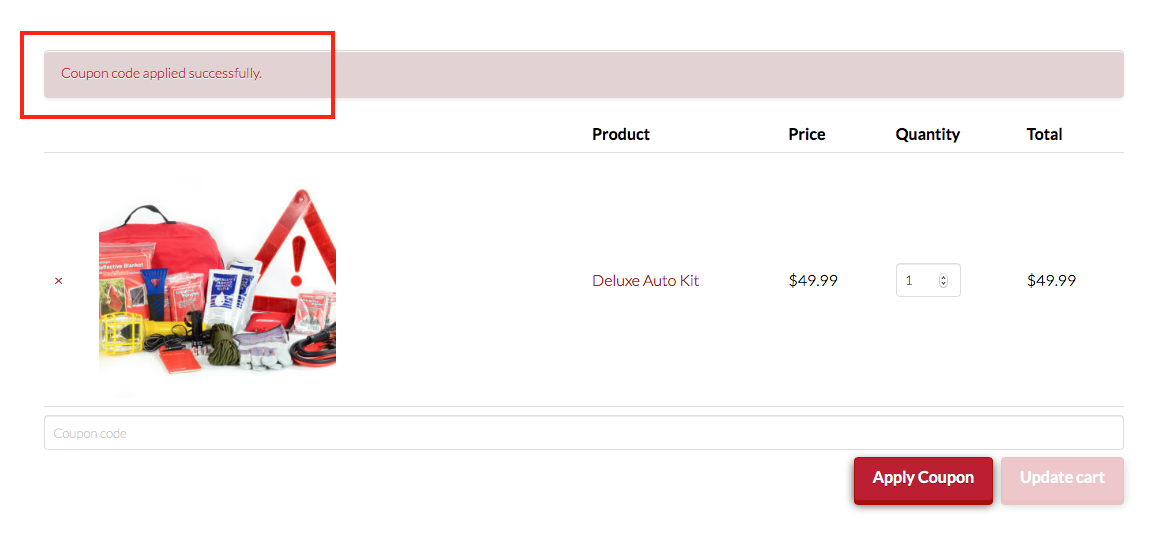
When an item is added to the cart on my website, the text appears very small. It’s difficult to read. This is what it looks like when a coupon is added.

How can I make this text Larger?

Also, is it possible to make the product description (for example, in this picture, the part that reads: Deluxe Auto Kit - $49.99 … ) a bit bigger too?
Thanks so much for your help!
:slight_smile:

Hi Nadia,

Thank you for writing in, please add this to Theme Options > CSS for adjusting the alert/notice font size

/*alert / notice text*/
.x-alert, .wpcf7-response-output, .buddypress #message, .bbp-template-notice {
	font-size: 1.25em;
    font-weight: 600;
}

And this for the title and the price.

/*product title and price text*/
body.woocommerce-page td.product-name,
body.woocommerce-page td.product-price {
	font-size: 1.25em;
}

Feel free to adjust that 1.25em value.

Hope it helps,
Cheers!

1 Like

This topic was automatically closed 10 days after the last reply. New replies are no longer allowed.
