Make .x-brand.text { } and .x-nav { } different color when header is transparent

Hi - I have already added the below CSS and JS to my Integrity Stack theme, which makes my header transparent at the top, and then white as you scroll down. I need help changing the navbar text to white when the header is transparent. Can you please help?

CSS added:

.x-navbar { background: transparent none repeat scroll 0 0; border: medium none; box-shadow: none; } .x-navbar.x-navbar-fixed-top { background-color: #fff; border-bottom: 1px solid #ccc; box-shadow: 0 0.15em 0.35em 0 rgba(0, 0, 0, 0.133); }

.masthead-inline { position: absolute; top: 0; left: 0; width: 100%; } .x-navbar-fixed-top { background-color: #fff; }

.x-navbar { box-shadow: none !important; border-bottom: none !important; }

JS Added:

jQuery(function($){ $(window).scroll(function(){ if( $(this).scrollTop() == 0 ) { $(’.x-navbar-fixed-top’).removeClass(‘x-navbar-fixed-top’); } }) });

Hello Dan,

Thanks for writing in!

As you change the background color of the navbar, it is happening because of your custom css:

.x-navbar {
     background: transparent none repeat scroll 0 0;
     border: medium none;
     box-shadow: none;
}

 .x-navbar.x-navbar-fixed-top {
     background-color: #fff;
     border-bottom: 1px solid #ccc;
     box-shadow: 0 0.15em 0.35em 0 rgba(0, 0, 0, 0.133);
}

To change the color of the brand text and the nav items, you should be using the CSS class specificity. Therefore the code will be like this:

.x-navbar .x-brand.text {
  /* your styling */
}

.x-navbar.x-navbar-fixed-top .x-brand.text {
  /* your styling */
}

The same pattern goes with the .x-nav{}. Hope this makes sense.

@ruenel - thanks so much for the fast response!

I added the above code, but still no luck.

My end goal is this: when the page is at the top, I would like a transparent header, with white text. When scrolling down the page, I would like a white header with black text. I have solved all of these things (by looking at the forums and adding in the code I showed above), but am unable to get the white text for the header at the top. I would like for this to only happen on the homepage.

I tried your above code additions, and it was unable to affect that CSS class specifically. Any other way to solve for this? Thanks again for the help!!

Website while at top

Hello Dan,

Your code did not work because you are added this:

.x-navbar.x-brand.x-text{
    color:#FFC0CB;
}
.x-navbar.x-navbar-fixed-top.x-brand.x-text{
    color:#FFC0CB;
}

If you look closely at my example code in the previous reply, there is a space between the .x-navbar and .x-brand.text Therefore, the code MUST be this:

.x-navbar .x-brand.text{
    color:#FFC0CB;
}
.x-navbar.x-navbar-fixed-top .x-brand.text{
    color:#FFC0CB;
}

Hope this explains your issue.

@ruenel - yes, that did solve that issue. I have one last question - how do I get these navbar settings to only apply to the home page? I believe it has something to do with the JS query, but I can’t figure it out. Below is my query below. Let me know, thank you!!

.jQuery(function($){ $(window).scroll(function(){ if( $(this).scrollTop() == 0 ) { $(’.x-navbar-fixed-top’).removeClass(‘x-navbar-fixed-top’); } }) });

Hello Dan,

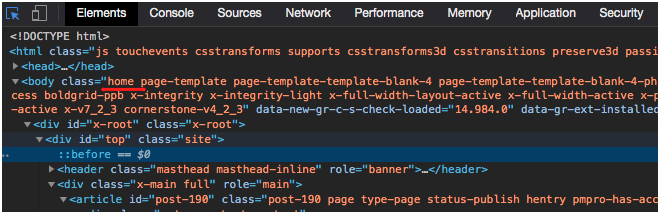
The body element of the homepage will contain a home class which you can use this class as one of your conditions in the code.

Screen Shot 2020-12-07 at 1.08.42 PM

You can use the jQuery hasClass function as one of your condition:

Example code:

if ( conditionA && $('body').hasClass('home') ) {
   // do something
}

Be advised that custom coding is beyond the scope of our support. You will have to maintain any code that you may add to your site,

Hope this makes sense.

That makes sense, and thank you for your help!

Hi Dan,

Glad to help you.

Thanks

This topic was automatically closed 10 days after the last reply. New replies are no longer allowed.