Our website has been designed for the Template to be “Layout - Full Width”. We would like to change the entire website Template to be " Blank - No Container | Header, Footer". Is there a ready solution to this?
Hello Jack,
Thanks for writing to us.
Yes, you can use this page template " Blank - No Container | Header, Footer" to make the page full width. You should also set the Site Layout as Full-width form X/Pro -->Theme Option -->Layout and Design.
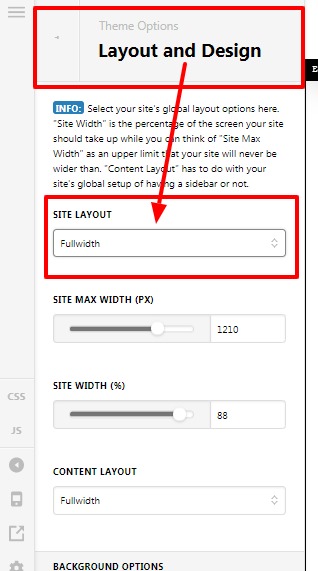
If there is no sidebar in your design then you should set Content Layout as Fullwidth.
Thanks
Thank you.
This appears to be a page by page solution. Is there a solution which will alter the entire website without a manual “page by page” fix?
Hi Jack,
There’s no option in our theme settings to set a global template to go full width. This would require custom CSS and it is not advisable to change it because you might have some problem with the responsiveness of your website. Regretfully, providing custom CSS code is outside the scope of our theme support. You may seek 3rd party developers to help you with your problems or you can avail One where we can answer questions outside of the features of our theme.
Hope that helps and thank you for understanding.
This topic was automatically closed 10 days after the last reply. New replies are no longer allowed.