Make slider in modal responsive to all screens

Hi,

I set up a Single Layout to an example of Josh Donnelly did in this video:

It al works very nice but the gallery in the modal is not fitting in my screen and absolute not in smaller screens.
My page is here: http://www.holy-chic.nl/staging/projects/droomvilla/

I tried a lot but I can’t manage how to make the slider fit in all screens with image always fitting the screen with navigation arrows and the pagination always at the bottom of the page.

Can you please help me how to make this lightbox fits in all screen sizes?

I wil send you a login!

THX, Carel

Hello Carel,

Thanks for writing in!

In your Slider Container, change the “Alignment” to Start:

And then in the Image element, set the maximum height to “80vh” so that in all of the screen sizes, the maximum height of the image will not exceed the whole screen.

Best Regards.

Thank you!

Exactly what I wanted on desktop but on mobile it is not good… See screen.

Is it possible to make this look good on all screens (breakpoints)?

THX, Carel!

IMG_5079|231x499

Hey Carel,

Your Modal element structure should be changed to this:

1.) The Pagination element should be relocated outside of the Slider (Stacked) element.

2.) The Modal > Backdrop & Close > Size setting should be changed on smaller screens so that there would be a little gap on the left/right side of the modal content.

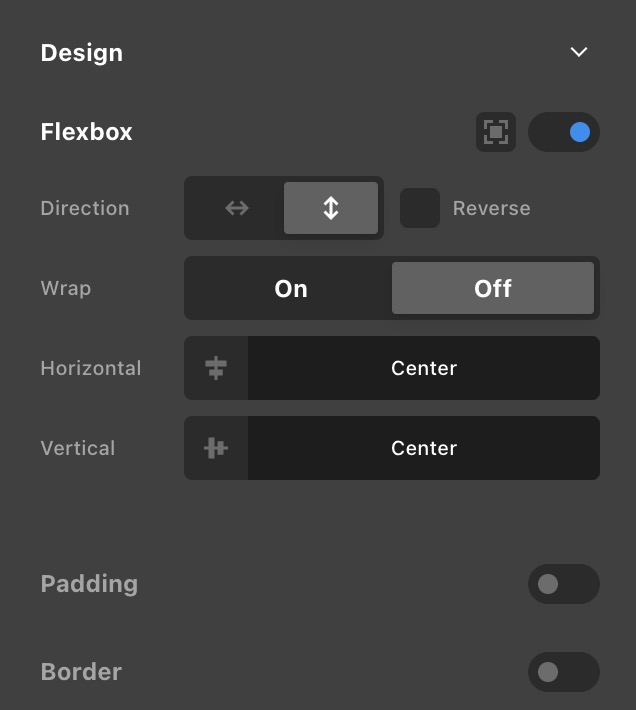
3.) Enable Flexbox in Modal > Design setting and align to “Center”

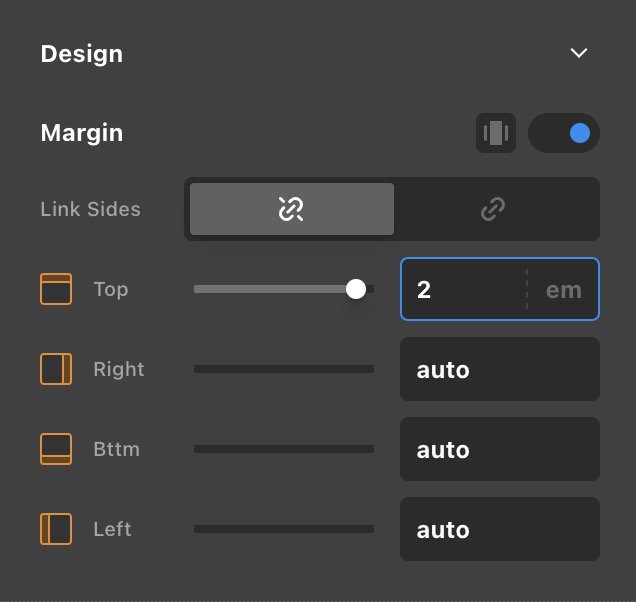
4.) The Pagination element must have a Top margin.

5.) The Slide Navigation element must have a width of calc(100% + 6em). It needs 6em because each of the left and right icons has 3em.

6.) The Slide Navigation element also needs a -3em left margin so that it will always be at the center of the page.

Be advised that because you have a mixed of portrait and landscape images, those landscape images may display a little smaller on smaller screens.

Best Regards.

Brilliant! Thank you very much!

Maybe an idea to combine this with the video of Josh for a complete tutorial How to set up a custom portfolio with ACF and lightbox and publish it in Max?

Thanks, Carel

Hi Carel,

Glad that we are able to help you with this, and this is a great suggestion. We will surely check and add this as feature request so our development team consider this in the future.

Thanks

This topic was automatically closed 10 days after the last reply. New replies are no longer allowed.