Make one very wide image slide through the screen

Hi :slight_smile:

FYI this is on mobile. I’ve tried my best using the Slider Container with a single slide containing my very wide image (+2000px). Below is the best I could do. Unfortunately the image overflows on itself as you can see in the circled part.

I’ve found another similar topic on the forum but it seems it was a different version of Cornerstone.

Can you please help?

Thank you!!!
Hello @Delamour,

Thanks for writing to us.

It is not possible to guide with only screenshots I would request you please share the exact page URL so that we can check it on our end and guide you properly.

Thanks

Hello Prakash,

Thanks for responding.

The URL is www.notevenwater.me . Please make sure to view it on mobile.

Thanks.

Hey Zineb,

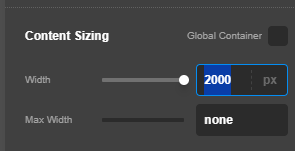
I tested your 2000px image on my site and I have replicated the issue. What works on my end is setting the Slider Container Width close to or exactly the same width as the image.

image

Also see the screencast in the secure note.

Hi Christian!
Thanks so much for your help. It worked! :slight_smile:
I had done the same with the image, not the slider container.
Thanks so much for helping. Have a great day.

Hi Zineb,

You are most welcome.

This topic was automatically closed 10 days after the last reply. New replies are no longer allowed.