Hi there,
How can make the primary menu colour linear gradient?
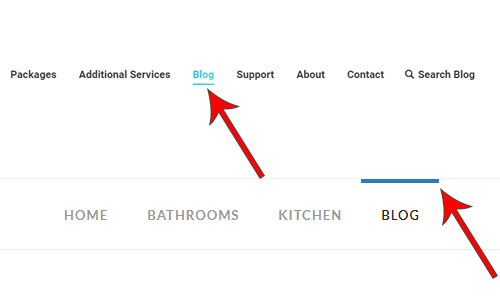
How can I move the current blue item bar under the menu text?
Thanks,
Unen
Hi there,
How can make the primary menu colour linear gradient?
How can I move the current blue item bar under the menu text?
Thanks,
Unen
Hi Unen,
Thank you for reaching out to us. You can add the following code in the Theme Options > CSS:
.x-navbar .desktop .x-nav > li > a:hover span, .x-navbar .desktop .x-nav > .x-active > a span, .x-navbar .desktop .x-nav > .current-menu-item > a span {
    background: linear-gradient(to right, #30CFD0 0%, #1b5978 100%);
	-webkit-background-clip: text;
	-webkit-text-fill-color: transparent;
}

.x-navbar .desktop .x-nav > li > a:hover, .x-navbar .desktop .x-nav > .x-active > a, .x-navbar .desktop .x-nav > .current-menu-item > a {
    box-shadow: none !important;
    border-bottom: 4px solid #30CFD0;
}
Please note that text gradient colors will only work in WebKit browsers please see https://css-tricks.com/snippets/css/gradient-text/
Here are some related links for further reading, this could help you in finding and implementing some CSS fixes:
Hope this helps!
Thanks Nabeel,
Is it possible to make the line (border bottom) gradient?
Thanks,
You’re always welcome Unen.
Yes, it is possible but it would need more customization. Since we have shared some guidance on the previous reply on how to handle/implement CSS fixes, here is the guide to add gradient border:
It is not a straightforward setup, but rather a workaround to achieve the same result. Hope this helps.
Great, thanks
You’re always welcome!
Cheers.
This topic was automatically closed 10 days after the last reply. New replies are no longer allowed.