Main menu losts its transparency in other browsers

Hi,

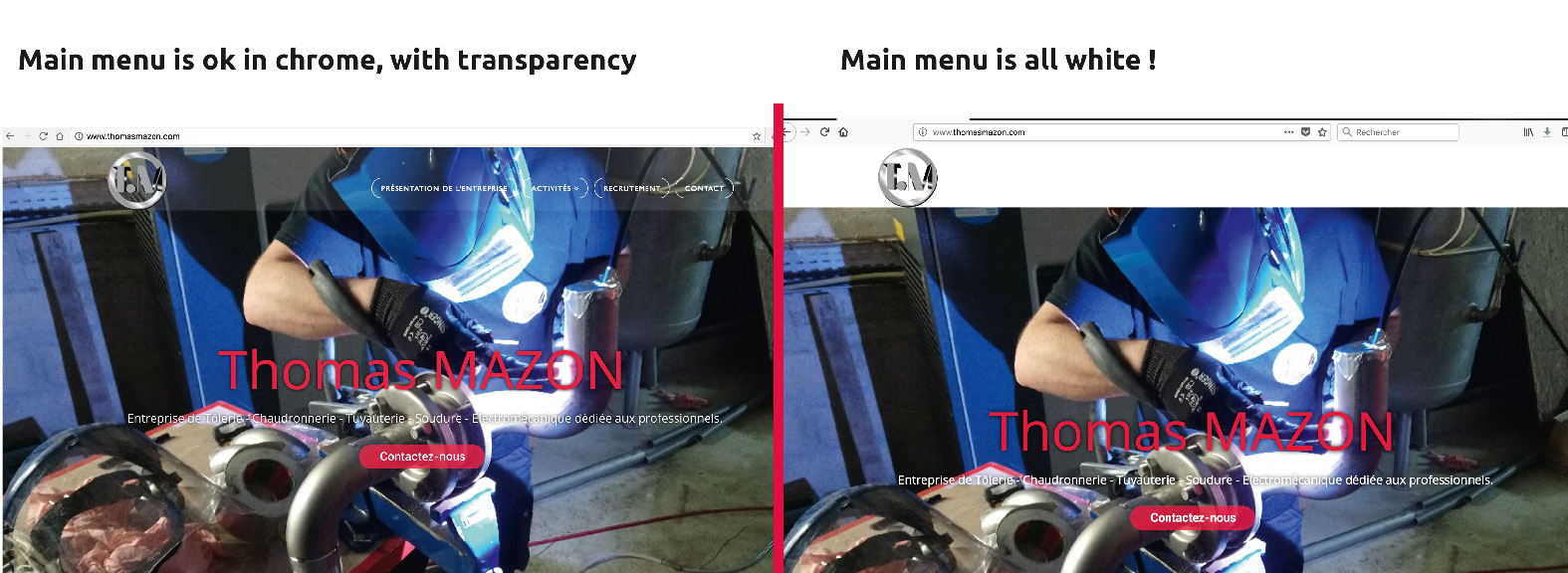
I can’t understand why, but my main menu losts its transparency in other browsers.

Here is the link to the website and a screenshot in chrome (it works) and in firefox (the same result occurs on smartphones too). All white, my menu is not readable.

Many thank you for your help !

Best regards,

Stéphanie.
Hi There,

Thanks for writing in! If you’re using any caching plugins, make sure to purge your server cache. Try disabling your 3rd party plugins and test your issue again. Also copy all of your custom CSS rules into an online tool like CSS Lint (http://csslint.net/) and check whether if there are any errors.

If that doesn’t help, please provide us with login credentials, so we can take a closer look. Please provide following information:

Set it as Secure Note

  • Link to your site
  • WordPress Admin username / password

Thanks!

Hi,

Thank you for your answer.
The clue was an overflow “hidden”.
.x-navbar {
background-color: rgba(133, 135, 138, 0.2) !important;
border: 0;
overflow: hidden;
}

We’ve just found it, so I share it with you all.

Many thank you for your help !

Best regards,

Stéphanie.

Glad you’ve sorted it out :slight_smile:

This topic was automatically closed 10 days after the last reply. New replies are no longer allowed.