Howdy, @nhook,
Thanks for writing in! I logged into your site to take a look at things, but didn’t want to delete any content and potentially remove something you need. However, if you follow these steps below, you should be able to easily remove these Text Elements that you can no longer see:
- Open up your homepage in the Content Builder.
- Click the Skeleton Mode button in the bar to the left of the screen.
- Locate the Section containing your elements you need to delete but can’t see visually in the builder, and select the element you believe you need to delete.
- Once clicked, the element will be inspected and you can see its contents in the workspace to the left. If it is the element you are looking for, click the delete button to remove it from your page.
Here is an image outlining steps 2-4 once you’re in the builder:
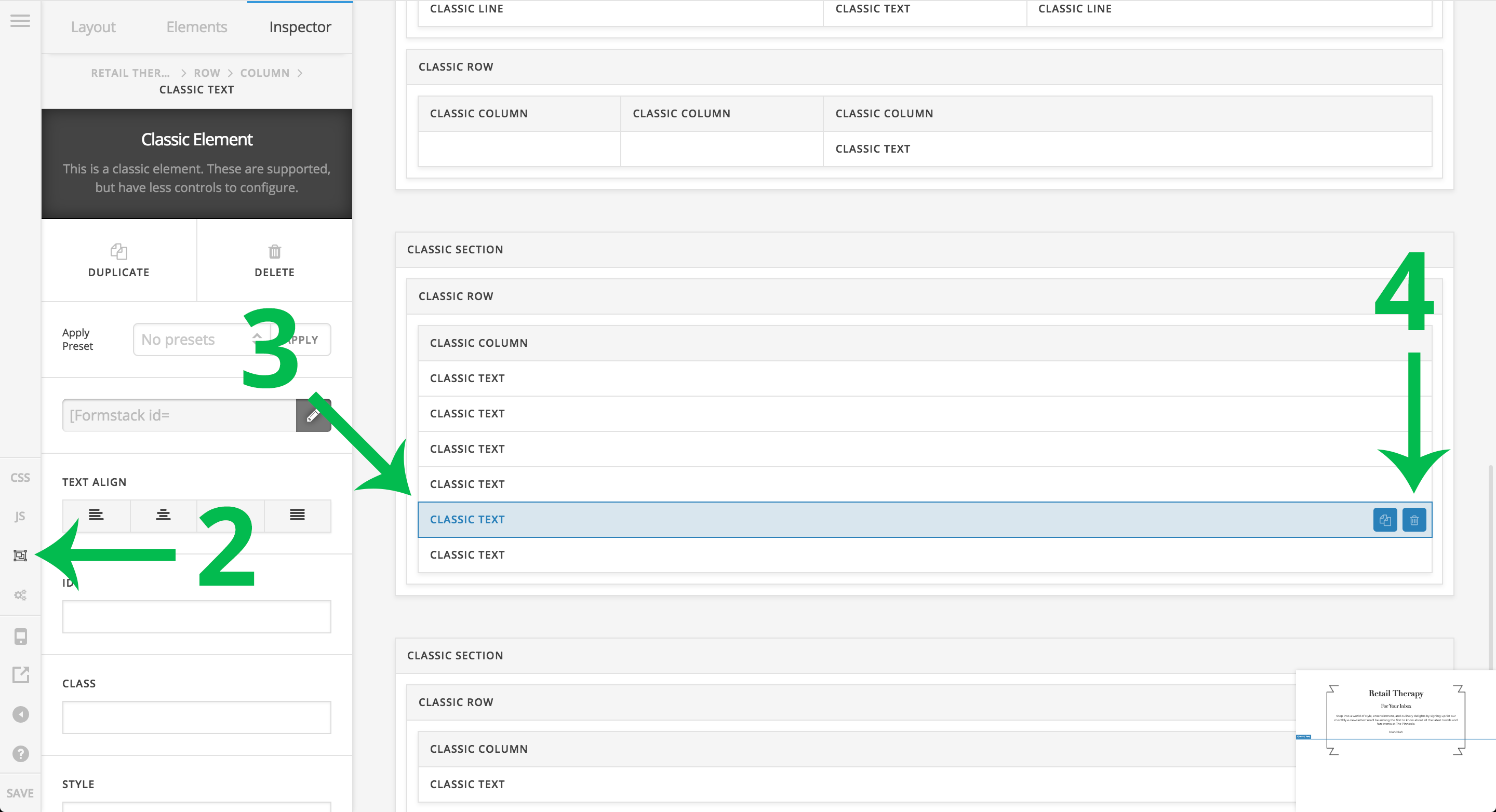
Skeleton Mode is included for situations like this, where you need to access something that isn’t taking up any physical space and the builder can’t reflect, or if you just want a “10,000 ft.” view of your page layout and want to quickly move things around between Sections, Rows, Columns, et cetera.
Hopefully this helps to point you in the right direction to take this and make adjustments where needed throughout your design. Cheers!
