Looper section hide if a sub-provider returns an empty result

I am trying to make a portfolio page that has sections based on a custom post type. The looper creates a new row for each of the post type, then inside of that row is a header with the post type title, then project component cards based on a relationship field in the post type. This is all working but I want to hide a row if that post type has no results in the relationship field. How would I achieve this?

You can login using the provided credentials. The page is “Portfolio”

In addition, I am noticing an issue in cornerstone where the first row is not populating projects, but it is on the site outside of cornerstone.
Hello @ZEBRADOG,

Thanks for writing to us.

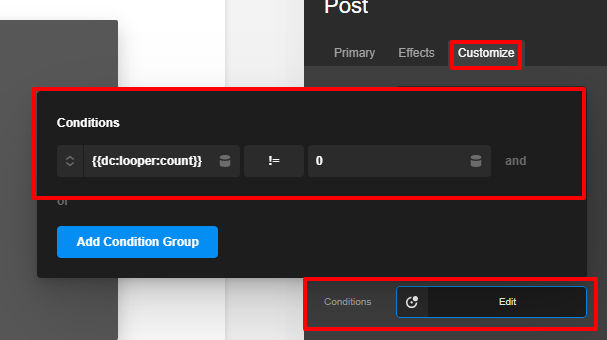
You can use the {{dc:looper:count}} != 0 as your condition. Please have a look at the given screenshot below for the condition.
About-The-Tests-Page-Cornerstone (28)

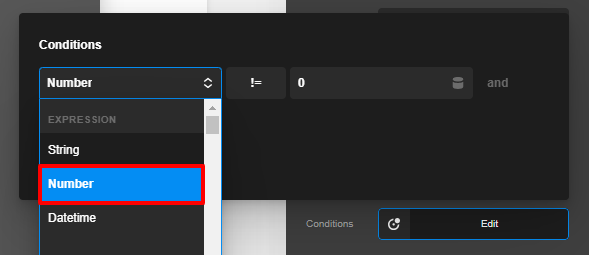
Please make sure you have selected the number on the condition expression field
About-The-Tests-Page-Cornerstone (29)

Hope it helps
Thanks

Hello, that did not seem to work for my specific case. I think it is due to the way I have it set up, I have the row with a provider of the post type, then a column with the provider of the relationship. I want to hide the whole row based on the columns provider.

Hello Kyle,

I have logged in and check the ACF fields. The “Case Studies” and “Markets” are two separate and independent fields. You can not nest them together. You will have to have two separate Looper.

  • Looper Provider to display Case Studies

    • Looper Consumer
  • Looper Provider Markets

    • Looper Consumer

Hope this makes sense.

Correct, that is what I have setup, however what I need to do is hide the looper Market if its nested looper Case Studies doesn’t have results.

Hi Kyle,

But as my colleague told that you have defined these two as different fields it can’t be nested.

Thanks

This topic was automatically closed 10 days after the last reply. New replies are no longer allowed.