Looper Provider

Hey guys, I’m testing the new looper provider function. I’m able to generate the content I want to show via the query builder, but the content is repeating on the page. How do I limit the content to specific set of posts? Here are my settings:

I’ll post a link to the test page in a private comment.
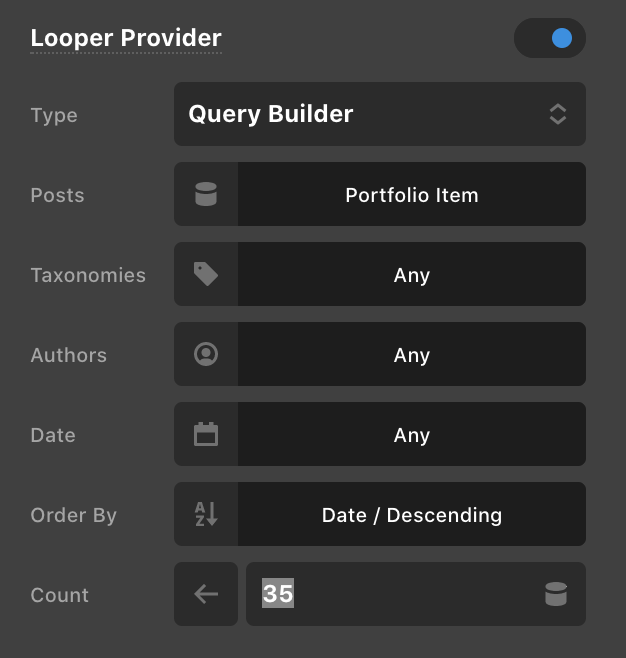

Hello @andrew_alonso,

Thanks for writing in! Please set the “Count” to Default. When it is set to default, the number of portfolio items will be using the global post count you have set in Settings > Reading > Blog pages show at most setting.

Hope this helps.

Thanks Ruenel, that did it!

You’re welcome, @andrew_alonso

Hi @andrew_alonso,

It might be better to set the WordPress setting to something like 10 so it will use that Globally. Then in your Looper Provider you could set Count to 1 and it will only retrieve one post there.

Thanks Alexander, if I set the count to 1 then it only shows 1 post instead of the 35 I want to show.

Hi @andrew_alonso,

I checked your site portfolio page and there are 31 no. of portfolio items are shown. By setting 1 in the Count, it will show the 1 item, but if you set 35 instead, it will show all the posts if the number of posts is lesser than the given limit. If that is not the case, can you please provide login credentials for your site in a secure note to examine it further, including:

– WordPress Site URL & Login URL
– WordPress Admin username/password

To create a secure note, click the key icon underneath any of your posts.

Thanks

This topic was automatically closed 10 days after the last reply. New replies are no longer allowed.