No worries, totally understood. I had to ask, just to make sure I wasn’t missing something.
Not sure if this will make things easier, but I had Codex kick me out some updated code.
# Cornerstone Looper Provider: Menu Location Support

## Request

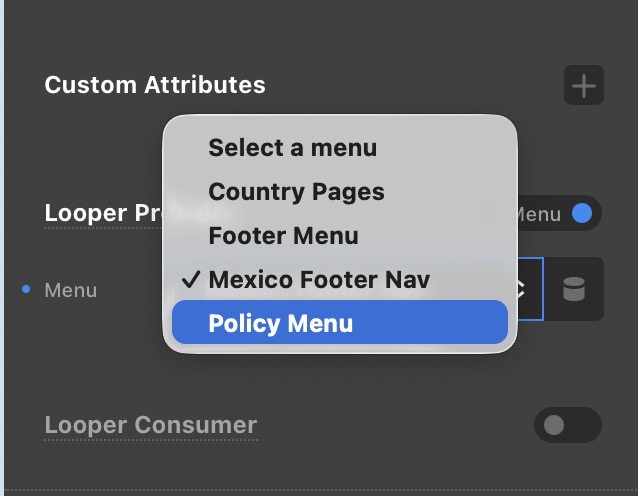
Please add Menu Location support to the Cornerstone **Looper Provider → Menu** control.

The Inline Navigation element already allows a user to select either a specific menu or a registered Menu Location, such as `Primary Menu` or `Footer Menu`. The Looper Provider → Menu control currently exposes only menus returned by `wp_get_nav_menus()`.

## Expected behavior

The Menu control should expose:

```text
menu:<term_id>
location:<registered_location_slug>
```

When `location:<slug>` is selected, resolve the current assignment at render time:

```php
$locations = get_nav_menu_locations();
$menu_id = $locations[ $slug ] ?? 0;
```

This allows the Looper to follow the menu currently assigned to that location on each site.

## Current patch

### 1. Add locations to the Menu choices

File:

```text
includes/dynamiccontent/menu.php
```

After the existing `wp_get_nav_menus()` loop:

```php
foreach ( get_registered_nav_menus() as $location => $label ) {
    $out[] = [
        'value' => 'location:' . $location,
        'label' => sprintf( __( 'Menu Location: %s', 'cornerstone' ), $label ),
    ];
}
```

### 2. Resolve location values in the Menu Looper

File:

```text
includes/loopers/menu.php
```

Before `wp_get_nav_menu_items()`:

```php
if ( is_string( $menu_id ) && strpos( $menu_id, 'location:' ) === 0 ) {
    $location  = substr( $menu_id, 9 );
    $locations = get_nav_menu_locations();
    $menu_id   = isset( $locations[ $location ] ) ? (int) $locations[ $location ] : 0;
} elseif ( is_string( $menu_id ) && strpos( $menu_id, 'menu:' ) === 0 ) {
    $menu_id = (int) substr( $menu_id, 5 );
}
```

Keep the existing stale-menu guard:

```php
$items = wp_get_nav_menu_items( $menu_id );

if ( ! is_array( $items ) || empty( $items ) ) {
    return [];
}
```

## Compatibility requirements

- Existing numeric menu IDs must continue to work.
- Existing `menu:<term_id>` values should be accepted for exported or migrated data.
- Location resolution must use the active site’s `get_nav_menu_locations()` result.
- WPML and other `wp_get_nav_menu_items()` filters must continue to run.
- Current-menu classes should continue through `_wp_menu_item_classes_by_context()`.
- An unassigned or deleted location should return an empty result without warnings or fatals.
- Choice labels must remain translation-ready.

## Verification performed

- PHP lint passed for both modified files.
- Seven registered Menu Locations were exposed by the dynamic Menu choices.
- `location:primary` resolved to the assigned menu and returned 21 menu items.
- A direct menu ID continued to return 21 menu items.

## Upstream note

The production patch is currently in the Pro/Cornerstone theme files. Please implement this in the Cornerstone source and release it through the normal update process so the behavior is not lost during a theme/plugin update.