Hi there,
I created a related products looper, and all is well a part from the featured image being cropped and I can’t figure out why…
I’ll add login details below
many thanks
Hello @fabpiazzini,
Thanks for writing to us.
I tried to access your site dashboard but unfortunately, the default WordPress login URL(domain-name/wp-admin) is not working. Please provide your WP login URL so that we can access your site’s backend and then check your settings. Please find the screenshot in the secure note.
I would also suggest you troubleshoot with a few of the common issues before we investigate your settings.
- Testing For Theme Related Issue
- Testing For Plugin Conflict
- Theme Update
- Child Theme
- Css/Js Customization
- Increasing Php Memory Limit
- Disabling Cache
- Disabling Cdn
- Permalinks
- Version Compatibility
Hope it helps
Thanks
Hi, I need to allow access from your location on our server, for this I need to know which country you are connecting from, or if you can access with a VPN with Spanish IP
Hello @fabpiazzini,
I was able to access your site today. I went ahead and checked your site and the WC single product layout. It seems that you have not yet assigned any related product. I would suggest you assign the related product there to your layout that you have created. Please let us know if it is not working for you.
Thanks
Thanks, not sure why you aren’t seeing the product. In fact look at this link and you should see more than the item in the pic as I assigned various items to the Layla product. There must be something wrong with the looper but I can’t pin point the issue there either!
the looper provider:
post_type=product&post_status=publish&ignore_sticky_posts=1&posts_per_page=4&orderby=asc&order=asc&tax_query%5B0%5D%5Btaxonomy%5D=product_visibility&tax_query%5B0%5D%5Bfield%5D=name&tax_query%5B0%5D%5Bterms%5D=featured&tax_query%5B0%5D%5Boperator%5D=IN


Another small thing I need help: how do I add tabs within the tabs I already have (you can see 3 tabs on the page) ? The shortcode I tried gives me a different tab than the parent tab…
here’s the shortcake I tried
[tab_nav type=“two-up” style=no border][tab_nav_item title=“Click Me!” active=“true”][tab_nav_item title=“No, Click Me!” active=""][/tab_nav]
Many thanks!

Hello @fabpiazzini,
Please temporarily deactivate your geolocation log-in restrictions because our staff works in several locations at different timezone. This is why some staff was able to access and some others do not.
Thank you.
hi you should be now able to access from anywhere in the world.
Many thanks

Thanks, that’s must WordPress… try again as it works here for us
Hello @fabpiazzini,
I am still seeing the error. Maybe I am using the incorrect login URL. Can you please send us your WP Login URL?
Thanks.
I’m sorry but I have no issues on my end with both URL… not sure but normally 502
I’m trying to troubleshoot on our end but yet to find any issues. Can you check the suggestions on this link?
Thanks
Hello @fabpiazzini,
I already have checked everything. I can view any other site even your homepage and your product page. As soon as I log in to your site, I encounter the error 502. Anyway, please edit your custom related product looper and make sure that you use the featured image dynamic content to make sure that it will display the large or original feature image size.

If you can take a screenshot of your loper structure and your image settings, that would also help us.
Regards.
Thank and I’m sorry you still get the error; I’ve asked the server support team to look into it.
In the meantime here are the screenshots of the looper and image setup.
The looper provider code:
post_type=product&post_status=publish&ignore_sticky_posts=1&posts_per_page=4&orderby=asc&order=asc&tax_query%5B0%5D%5Btaxonomy%5D=product_visibility&tax_query%5B0%5D%5Bfield%5D=name&tax_query%5B0%5D%5Bterms%5D=featured&tax_query%5B0%5D%5Boperator%5D=IN

 !
!

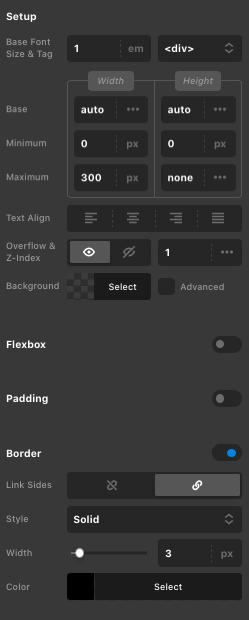
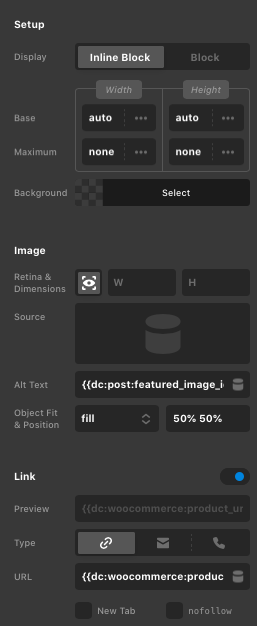
Hello @fabpiazzini,
For the Object Fit and Position option, please cover and 50% 50%.
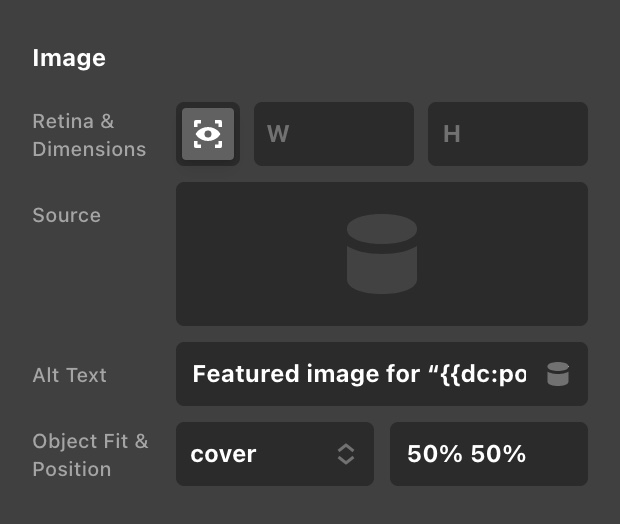
Hope this helps.
Hi, thanks, I tried all those settings to no avail…
first could you check the looper provider code is good? For some reasons we always get the same item pull up instead of of the featured product we selected…
Again, thanks for your support!
Hi @fabpiazzini,
I’ve taken a look here and I see you’re using the Product Image and Product Title elements. Unfortunately those are not compatible with the query you’re using. The way the Query String provider works is it just does a normal WP Query and there isn’t a way for it to add the additional layers needed to access the returned posts as Products.
So you’re probably just getting the details of current product you’re viewing rather than the related ones. Try using the Featured Image and Post Title dynamic elements instead to see if this pulls the correct information.
We plan on adding WooCommerce specific looper types including one for Related Products, but this isn’t available just yet.
Thank you, I have found a workaround now with some native WooCommerce shortcake, not as nice as your looper tho!
Another thing that we are having issues with is page load times, it looks like there’s something really weird happen to our site as we cannot even analyse with GT metric or Pingdom… it gives us an error with no report.
We have gone through various guides and worked on the PHP with the hosting provider but it all points to some error on the theme. Could you check and let us know?
Many thanks
Hey @fabpiazzini,
The performance case is another topic so please open a separate thread for it because the longer the thread gets, it becomes confusing which often results to further back and forth.
Please give us the error message you’re receiving on the separate thread. That might give us a clue as to where the issue is coming from.
Thanks.
This topic was automatically closed 10 days after the last reply. New replies are no longer allowed.