Looper & Dynamic Content - Latest Posts breaking out of box

Hey there,

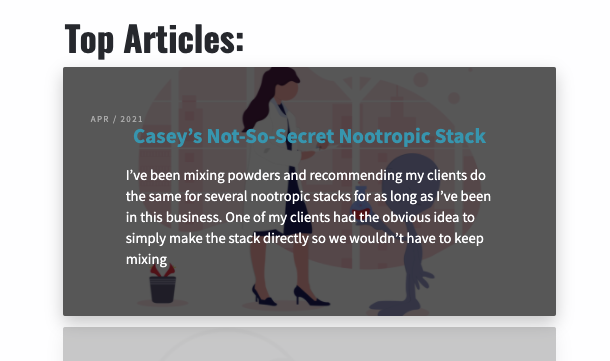
I’ve been experimenting with Loopers and Dynamic content to create Cornerstone elements that show the latest Blog posts. I believe I got this element from the Design Cloud but I might be wrong.

This is what it looks like normally:

However, when I scale the screen to a certain size. this happens with overflow:

I set the screen size rows and scaling so that after a certain size, it breaks out into its own rows:

But there’s a good percentage of screen sizes where it breaks and just has the text scrolling off the content tile.

Would appreciate advise / solutions to try and resolve this.

Thank you!
Cl

Hello @clovisd,

Thanks for writing in!

Please set the width of the “Published” text element to 100%.
Screen Shot 2021-04-25 at 6.55.58 AM

The “Article” div element’s Child Placement should be set to Row.
Screen Shot 2021-04-25 at 6.53.36 AM

Kindly let us know how it goes.

Hey there @ruenel,

That seems to have fixed it, however now I’ve got a couple issues:
image
(the date is centered)

Once stacking kicks in, then this happens:


I understand that I can hide those elements to not have them show up when they scale down but I’d like to still have the Date entry text visible, on its own line, and left aligned.

Thank you!
C

Hi @clovisd,

I have checked your site and found the issue you mentioned. I went ahead and added the following custom CSS to the Element CSS of the Text element named Published, and it resolves the issue.

$el.x-text
{
    display: block;
    width: 100%;
    text-align: center;
}

Thanks

1 Like

Hey,

This does work in most ways. I wanted the text to be Left aligned so I changed the CSS.

However, now on some screen size the date entry looks like so:
image

This isn’t the end of the world, I just opted to hide the date on the sizes where it broke the formatting.

Thanks again for the help!

In addition, is there a way to limit the size / char limit of {{dc:post:excerpt}}?

It looks good on certain screen sizes but the scaling breaks on other sizes:

I understand I can change / limit the excerpt length in the Wordpress settings but I don’t want it getting changed on the Blog page, just on that specific Dynamic Content field.

Maybe something like: {{dc:post:excerpt:300char}}

Thanks again!

Hi @clovisd,

You can use {{dc:post:excerpt length=“20”}} which helps you to mention the length of the excerpt.

Hope it helps.
Thanks

What about the right alignment for the dates breaking out of the container?

Edit: Excerpt length does not seem to be working? I’ve tried both {{dc:post:excerpt length=“20”}} and {{dc:post:excerpt:length=“20”}} with varying numbers and nothing changes.

Thanks again for everything else!

Hi @clovisd,

I check your top Articles and it seems that you already fixed the issue regarding the dates.

On the other hand, the reason why the excerpt is not working because you added it as {{dc:post:excerpt length=“5”}}… which is this clause “5” is wrong. Your code should be {{dc:post:excerpt length=“5”}}…. I went ahead and change it for you, just change the value to your desire limit.

Hope that helps.

Thank you.

This topic was automatically closed 10 days after the last reply. New replies are no longer allowed.