Long Form stories with PRO

Hi there,

How do you deal with very long text on a PRO page? The default page width will make a very long text quite difficult to read. It would be much nicer to have a limited width area for the text, and a full width header for an image with a title. I tried the Press 75 StoryBuilder, and like it, but it hasn’t been updated for 5 years, and is a bit short on options.

Revolution Slider and PRO Global Blocks should make it possible to do the same, perhaps even in a better way.

I’m wondering if anybody else has come across that issue, and if there is an easy or a suggested solution?

Thanks, and best regards

Harald
Hi Harald,

There are 2 ways to achieve it on page basis.
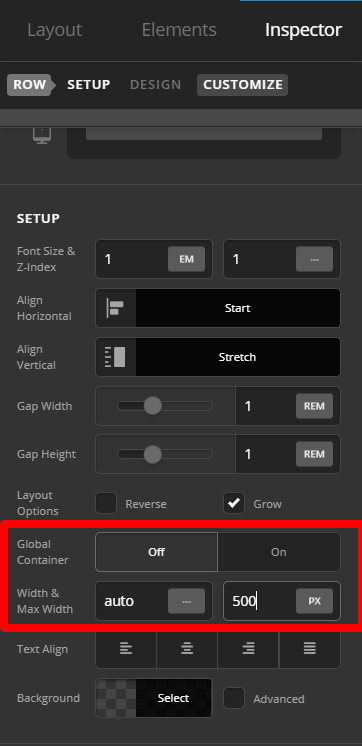
First, settings maximum width on ROW. First, set GLOBAL CONTAINER TO OFF. WIDTH AND MAXIMUM WIDTH options will be available. This settings means it will set width on this entire container:

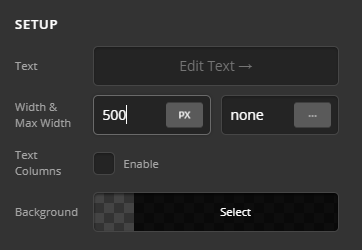
Another option is to set it on text element MAX WIDTH settings.

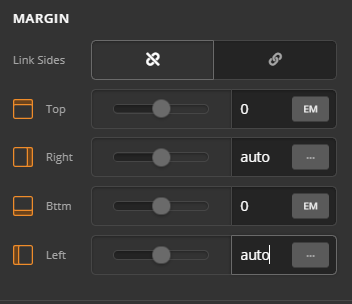
In case you want it to be centered, set left and right margin to auto:

That option for ROW and TEXT element can be done on GLOBAL BLOCKS too. In case this doesn’t achieve what you need, please share the URL and give us more information so we can check further. Thank you.

This topic was automatically closed 10 days after the last reply. New replies are no longer allowed.