Logo sizing

I’m looking to put my logo in the left corner of my header. I don’t want the header to get bigger as in drop down the screen further to cover the picture more. It there any way I can work out the best size to set the logo to for this?

Also is there any way I can make it retain it’s size so it doesn’t look huge when viewing on a mobile device?

This is my page http://www.rgualtphotography.com/home-2/

Also what is the best resolution when creating the logo so it doesn’t look blurry?

Sorry probably silly questions.

Thanks Rob

Hi There,

Your logo seems to be broken on my end:

Could you please add it again?

Then adding this custom CSS under X > Theme Options > CSS:

@media (max-width: 480px){
a.x-brand.img img {
    width: 100px;
}
}

Hope it helps :slight_smile:

Thank you for your reply, I’ve just added it again and I can see it so have a look again when you have a minute. I’d like it a bit further to the left to.

I’ll try the cs you added to.

Thanks Rob

Hi There,

Please update the previous CSS to this:

@media (max-width: 480px){
    a.x-brand.img img {
        width: 150px;
    }
}

.x-navbar-inner .x-container.max.width {
    width: 95%;
    max-width: 100%;
}

Hope it helps :slight_smile:

Hi, the css worked but the logo on a mobile looks blurry. How can I fix this?

Thanks Rob

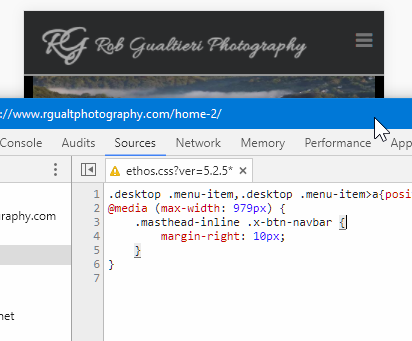
I’ve fixed the blurry side of things now. I know you like a new thread on bits but can I move the navbar button when viewed on a mobile in from the left as its sat right on the edge?

Thanks Rob

Hey Rob,

Please add this to your CSS

@media (max-width: 979px) {
    .masthead-inline .x-btn-navbar {
        margin-right: 10px;
    }
}

The vertical alignment looks a bit off. I’ll just add here that there’s an option to adjust that. It’s in Appearance > Theme Options > Header > Mobile Button > Mobile Navbar Button Alignment

For further questions, please open a separate thread. This is to avoid confusion not only for us but for other users as well.

Thanks.

This topic was automatically closed 10 days after the last reply. New replies are no longer allowed.