Hi there,
if I check the mobile view in the header builder, everything looks fine:

If I look at it on my android phone (chrome browser), the logo isn’t centered anymore:

Any idea how to fix this?
Best regards
Uli
Hi there,
if I check the mobile view in the header builder, everything looks fine:
If I look at it on my android phone (chrome browser), the logo isn’t centered anymore:
Any idea how to fix this?
Best regards
Uli
Hi Uli,
Thank you for reaching out to us. I checked your site and the Self Flex > Flex Basis value given to the Container (that has the logo) is causing the issue. Currently it is set to 400px, try changing it to 290px which is the actual width of the logo and see if this resolves the issue.
You can find this setting by inspecting the Container (the one that contains the logo) then under Flexbox go to the Self Flex settings:
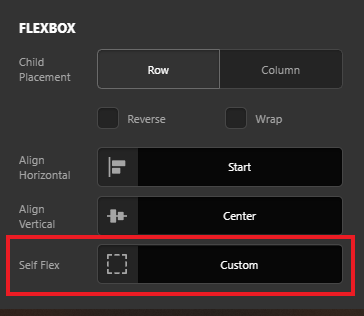
Let us know how this goes!
Hi nabeel,
I tried already different changes in the flex-basis (200 px, 300px), but none of theme worked.
Using 290px as you suggested worked perfect. Thanks a lot!
Best regards
Uli
You’re always welcome Uli!
Cheers.
This topic was automatically closed 10 days after the last reply. New replies are no longer allowed.