Logo fixed to top

Hi there,
first thanks for your great support.
I have a little question again:

How do I fix logo and navbar to top?
So both stays at the top even if I scroll the page below?

I tried this custom CSS, but it doesn’t work:

.x-logobar {
position: fixed;
width: 100%;
}

Thanks a lot!

Hello @lindahuether,

Thanks for asking. :slight_smile:

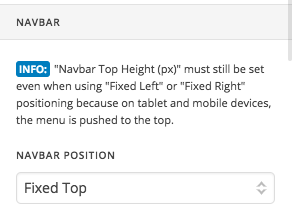
You can have fix logo and navbar from X > Launch > Options > Header > Navbar > Navbar Position > Select fixed top.

Thanks.

Thanks for answering!
I use that and stacked - the result is, that the menu is fixed, not the logo.

Best,
Linda

Hi Linda,

The fixed logo and menu would only work if you have set the header layout to Inline.

If you would try to use this for the stacked layout, you will have to do a bit more customization as this is not available out of the box.

I would suggest that you can set the header as Inline and add a custom CSS to make the logo display on top on menu. That way, they will both scroll together and they would be stacked accordingly with the use of the CSS.

Hope this helps.

Ok. I’ll try this way…
Thanks a lot!

Best,
Linda

You’re welcome, Linda.