Logo bar doesn't change size

Helio there!
I have uploaded a new logo bar that includes a transparentar layer . I would like the layer to run through the full wight of the screen but although I change the size of the pixel it doesn’t become larger than what you see now.
also if I change the size in the setting it doesn’t change.

do you have any idea of why?
here the screen shot
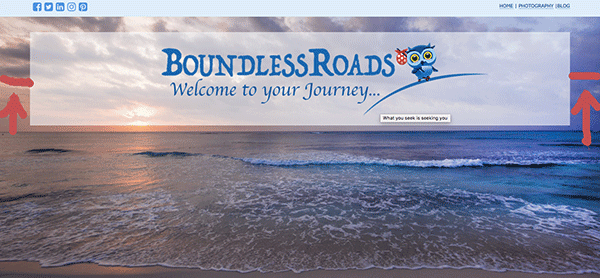
thanks a lot

Hi there,

Thanks for writing in.

I suggest doing this in Revslider since you already have (the background image). Then with slider, add shape element (box) and change its background transparency. Then above it, add your PNG image. With that, the transparent shape could go full-width while the logo stays on its size (not pixelated due to stretching).

Your logo is also positioned with absolute styling which isn’t responsive. With slider, all positioning are calculated by javascript and responsive.

Thanks!

hello there
i did it and I changed the logo. But it disappeared completely. actually it appears in some pages and not in others and always in different location in some in the middle of the post in others further up…

it’s all a mess… could you please help?

Can you please tell me how do I make the shape of the slider more lighter colour. I can’t seem to find how to change it.

thank you so much

Hi There,

We’ve already replied to you on this ticket: https://theme.co/apex/forum/t/logo-bar-is-not-in-the-same-location-in-all-pages/29712/5.

Regards!

This topic was automatically closed 10 days after the last reply. New replies are no longer allowed.