Logo and menú banner

Hi guys I have just changed with your help the logo and menú banner as you can see in my home page

however in the other pages and posts it does’t work. I can’t see the logo and the menú is in the middle of the post instead. here example https://www.boundlessroads.com/blog/

I need to have it like the homepage everywhere.
Could you please help me?
thanks a lot
regards

Hi there,

Thanks for writing in.

It’s because of how it’s implemented. The fix that is added is absolute positioning with static offset. And element with negative offset will overthrow on browser view once its dimension gets smaller. And in your blog page, the height is too small.

This is the culprit

.x-logobar {
    top: -75vh;
}

.x-logobar {
    position: absolute;
    left: 0;
    right: 0;
    width: 100%;
}

But since you’re using a slider and you wish to position your logo overlaying the slider (negative top offset). Why not just add the logo as image layer in the slider?

Thanks!

I didn’ t really understand what you have said but Ok I will do that. take out logo bar and put it in the slider :slight_smile:

however can you help me to position the menú bar under the pictures in the posts and pages?
i would really appreciate it.

UPDATE
hi guys! I have solved the problem of the navigation bar location which is now where it is.
by taking off a code.

What I need now is the navigation bar to stay white and not transparent when scrolling down .
I have tried different code but doesn’t work. IN the HOME page is working fine, just in the other page is not.

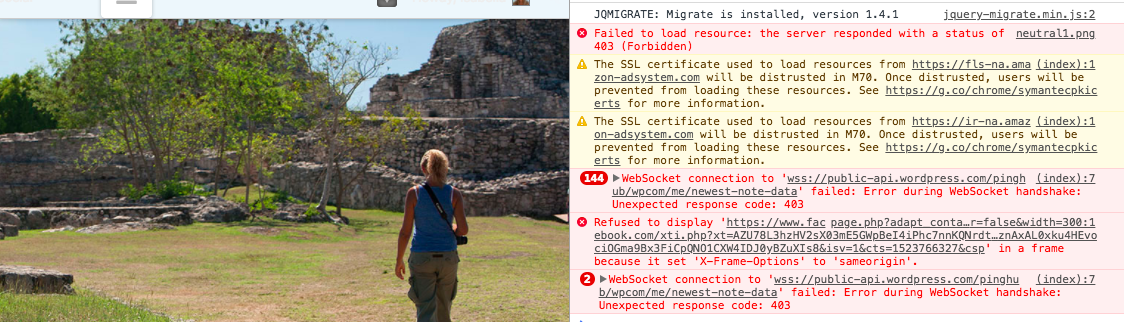
also I have found these errors which I don’t really have a clue what’s about. Could it be related to the issue?
could you help me
thanks
regards

Hey @isa1978,

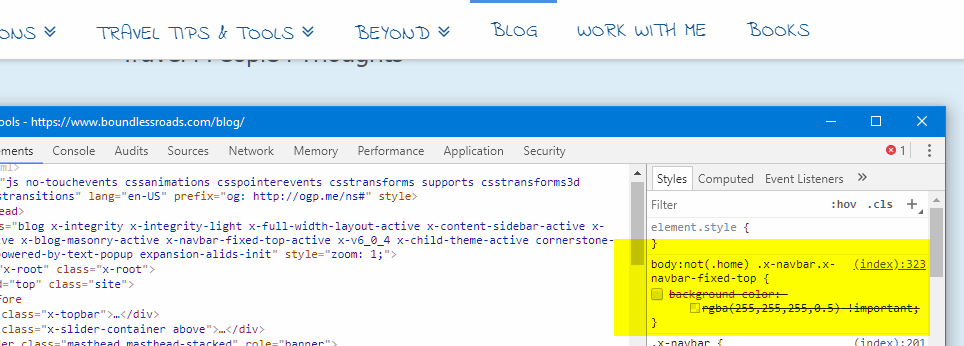
You have this code in your custom CSS causing the transparency.

body:not(.home) .x-navbar.x-navbar-fixed-top {
    background-color: rgba(255,255,255,0.5) !important;
}

Please remove it.

As for the errors, they are not coming from the theme. Please contact your host for the SSL warning and frame origin issue and do a plugin conflict test for the rest. You can do this by deactivating all third party plugins, and seeing if the problem remains. If it’s fixed, you’ll know a plugin caused the problem, and you can narrow down which one by reactivating them one at a time.

Thanks.

hi! thanks for this, it works. i will check for the rest :slight_smile: thanks much
best regards

Let us know how it goes!

This topic was automatically closed 10 days after the last reply. New replies are no longer allowed.