Loaded/ inserted template not saving with the page

Hi!

I have a strange problem that the inserted page template doesn’t want to save with the page.
When I insert the simple template and hit the “Save” I get the confirmation saying “Awesome, the page has been saved!”.

But when I try to view the page, it’s empty. Also when I reload the page in question into cornerstone, it’s empty.

Any advice?

Cheers!

Hi Jarkko,

Thanks for reaching out.

Are you referring to Gigs ENG template? It’s not saving because of added shortcode in the raw element. Example,

[add_eventon_list ux_val="1" number_of_months="25" hide_empty_months="yes" show_year="yes" hide_past="yes" lang="L2"]

And it outputs invalid HTML that breaks the content format. It could be a non-standard shortcode since all shortcode with proper implementation should work and the conflict doesn’t seems to be script related. I recommend contacting the author of that shortcode, all process content and HTML should be returned and not echoed within the shortcode.

Thanks!

1 Like

Thanks! I continue the dialogue with the developer :slight_smile:

You are most welcome. :slight_smile:

Hey, the plugin is supposedly update now - but I still have problems with the aforementioned page.

Could you please kindly check if anything shows up at your end? :slight_smile:

Cheers!

Hi,

Try to use a text element in adding your shortcode. I have created a test page where I added that shortcode ins a text element and it is saving fine without issues.

Thanks

1 Like

Hi!

It’s strange: when I assign a language (WPML) for a page and then try to insert the shortcode inside a text element, the page doesn’t save correctly; the saving is seemingly succesful but when I view the saved page it appears empty.

Also if I try to open it again in cornerstone, all elements have disappeared.

Hey Jarkko,

The Suomi page does not really save with or without the shortcode so the cause is different now.

There were errors in the console caused by Google Maps API which was coming from UberMenu; I disabled it but the issue with saving still persists even though there’s no more errors in the console.

I then went back to the page editor and Cornerstone outputs the generated shortcodes in the content but it fails to save the builder’s data which is the one that will be read in the front-end.
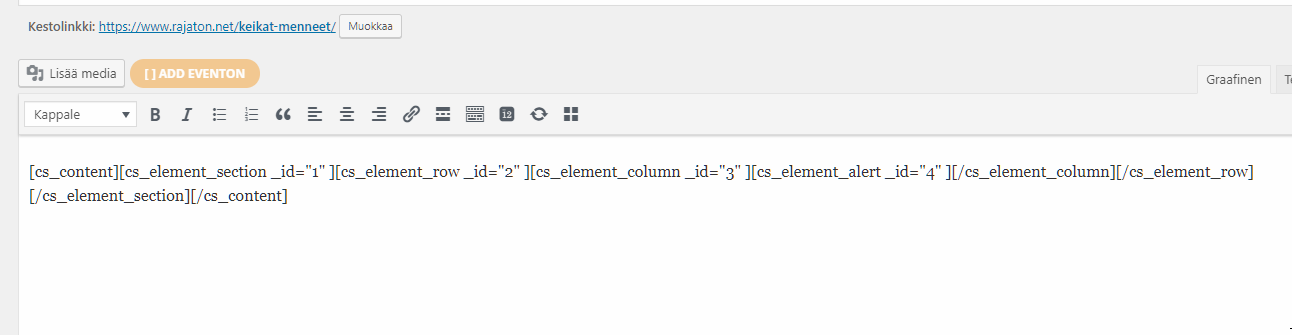
Something is causing that but I’m currently not sure what is. Would you mind deactivating all third party plugins to check if there’s a conflict?

Please also give us FTP access maybe we could find the cause by viewing the error logs and your setup in general.

Thanks.

1 Like

Hi! I started disabling WPML and voila, the page saved without a problem!

So the solution was to first create the empty pages and assign languages to them with WPML. Then WPML has to be disabled and the templates + shortcodes added to the page(s). After editing and saving the pages WPML can be enabled again and the page elements show up properly when viewed.

Cheers!

Hi Jarrko,

It could be the shortcode isn’t compatible with WPML, especially with translation. With translation, the shortcode and content are supposed to switch depending on active language. But glad you’re able to make it work with the workaround.

Thanks for sharing!

1 Like

This topic was automatically closed 10 days after the last reply. New replies are no longer allowed.