Links to real estate listings are no longer working with X theme but do work if I use Wordpress - 2

You closed my ticket on this which is under the same title as above without the -2. It got punted to the Estatik real estate plugin people as you said it was their problem.
I gave them the information you gave me.
Here’s what they’ve come back with and they are saying this is a problem with the theme. I’m inclined to agree with them, because, if you use another theme such as Twenty Twenty, it works fine. But they have more technical details below:

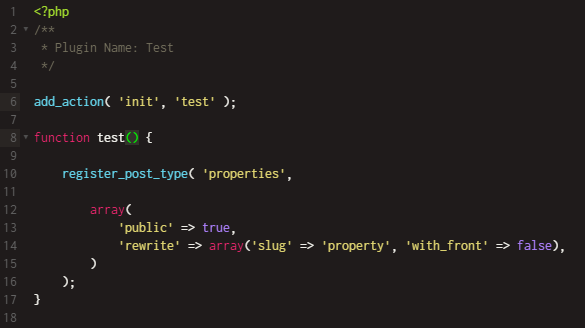
Unfortunately, I do not have the best news for the developers of the X theme. Our developers downloaded the entire project of your site, installed it on the local site, and left only the register_post_type function for register properties post type from the plugin code. This piece of code>> registers properties post type through the standard WordPress function register_post_type. The problem has not disappeared.

The error>> we get when trying to load a listing page indicates the X theme.

So I recommend that you contact the topic support again and attach the screenshots I provided to you. I think this time it will be more than convincing evidence that the problem is on their side.

If you require any further information, feel free to contact us at any time.

Have a nice day!

Hi @lidstone,

The reason that the forum post that you mentioned was closed is that there was no activity for ten days there. All the threads that do not have any activity within 10 days are closed automatically by the system.

I checked the previous thread and this one carefully to be able to assess the problem. Unfortunately, the plugin developers did not address the core issue that my colleague mentioned anyways.

The problem that you see is happening because for some reason the Cornerstone plugin is deactivated on the pages that the plugin is used. The fact that it is disabled causes the error that you see regarding the Gravity Forms plugin.

Even without that error, you will have problems using that plugin as many styling and stuff are done using the Cornerstone and those styling will not be there on pages that the plugin in question is used.

There is a simple way to test that. Please go to the file below and temporarily comment out the line 43 to 70.

wp-content/themes/pro/framework/functions/plugins/gravity-forms.php

This might interrupt the working of the Gravity Forms integration with our theme, but we are here to test the plugin in question. Now you go to the plugin in question pages and you will still see problems when it comes to rendering the page and that is because the Cornerstone plugin is disabled for that pages.

We also reject the fact that the developer said only registering a simple custom post type is what causes the theme to not function. Please kindly consider that our theme is used by thousands of clients and they create a countless amount of custom post types on their projects and our theme work with no problem.

To also make sure that we are on the same page, any conflict with third-party plugins that are not listed as our recommended plugins here is outside of our support scope. We will do our best to accommodate with the situation but we can not guarantee our theme to work with all the plugins there in the Wordpress ecosystem.

Thank you for your understanding.

Thanks. I will get back to Estatik yet again. This is proving to be a long and painful problem to get to root cause.

You’re welcome, @lidstone.

Hi again,
Estatik looked at this yet again based on the information that you provided. And now they are again coming to the conclusion that the issue is on your end. Here’s the new information they have provided:
Hi Glenn,

The problem is solved, but it can be a temporary solution.

I will explain the actions of our developers step by step.

  1. They disabled Estatik plugin and create a custom plugin with simple post type named properties.
    http://joxi.net/LmGyxX6uJ8pjMA

  2. If they don’t set any settings for this post type – everything works fine. But when they add a slug setting (URL slug) they get an error of Cornerstone.
    http://joxi.net/Drlzn5YU0RJDQ2

See image for next link 3
3. They change URL slug from property to properties and all works fine.

See image for next link 4
So Сornerstone triggers the error when URL slug equals “property” and it’s not just weird, it’s pointless.

I have a request for you. Please notify ThemeCo support that the problem is not with our plugin.

Our developers have spent a lot of time solving a problem they shouldn’t have been working on and would like ThemeCo to fix this ridiculous bug.

Hope, my answer helps.
Thank you.

Because of your rule about only 2 links (why???) I have to include an image with the rest of the information for you.


That actually makes it hard for you to get to the information (so what’s the purpose of only two links? Anyway…)
So can you please look at this again?
Thank you.
Glenn

Hey Glenn,

I just tested the claim of the Estatik developer and I didn’t get any error. See the screenshots below. I use the latest version of our X, Cornerstone, and Gravity Forms. The code is the same as what they claim to be causing the issue. If the bug is on our end, I should be getting an error.

image

If it’s not our theme nor the Estatik plugin causing the issue, there could be another factor causing the issue in your site. With that said, you should hire a personal developer to fix the issue as this will involve custom work which is outside the scope of our product support.

Thank you for understanding.

This topic was automatically closed 10 days after the last reply. New replies are no longer allowed.