I have two menus, one for “one page navigation” and one for the other pages. The menu for the other pages doesn’t work and I don’t know where else to look …
Hey Mauro,
Thanks providing us with credentials right off the bat. I saw that you already have 2 menus set up. One uses full URL like http://example.com/#section and the other the hash part only like #section. I also saw that the hash menu was already assigned as your homepage’s One Page Menu so all that is correct.
All you have to do now is make the Full URL menu as your Primary Menu so that’ll be used globally.
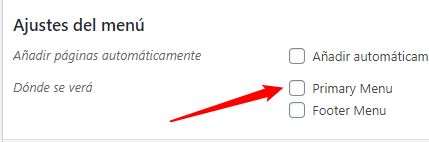
Hope that helps.
I have already assigned the menu as main but it still doesn’t work …

Hey Mauro,
Your custom JS is the one causing the issue. Once I removed it, the setup I’ve described works.
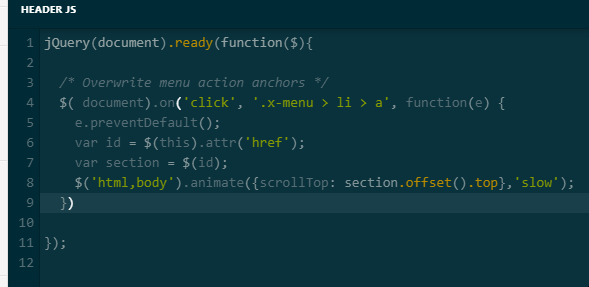
If you wish to continue using the custom code, please forward the issue to a third-party developer so s/he will edit the code and make it compatible with our theme.
Thanks.
You gave me this code …
and that same code is used on my own website and does not give any problem …
Already solved. When cloning the header 1 page navigation to make the new header do not remove the custom js
Glad you sorted things out,
Cheers!
This topic was automatically closed 10 days after the last reply. New replies are no longer allowed.