Our Approach links to anchor section #approach in both the top and bottom navigation are not working on mobile. I’ve searched for solutions, deactivated plugins, removed custom CSS, emptied cache and tried absolute and relative links - with and without the /. I’ve also updated the ID to something else to make sure it wasn’t an error with the anchor name. No JS errors that I see. Can you assist? Site is https://craigfrancisco.com
Hello Haley,
Thanks for asking. 
I checked the website and in mobile view upon clicking on the link it scrolls up one step at a time. Actually, it’s a known issue and we have informed our developers regarding this problem. I am not in a position to share ETA but you can keep an eye on our changelog page as latest product announcement is communicated via changelog page.
Thanks.
Thank you. Is there a workaround available until it is updated and fixed?
Hello Haley,
I am another staff checking in. I went back to your site and investigated the issue. I found out that the link is working. It is not displaying the section on smaller screens because you have hidden away the section for small screens.
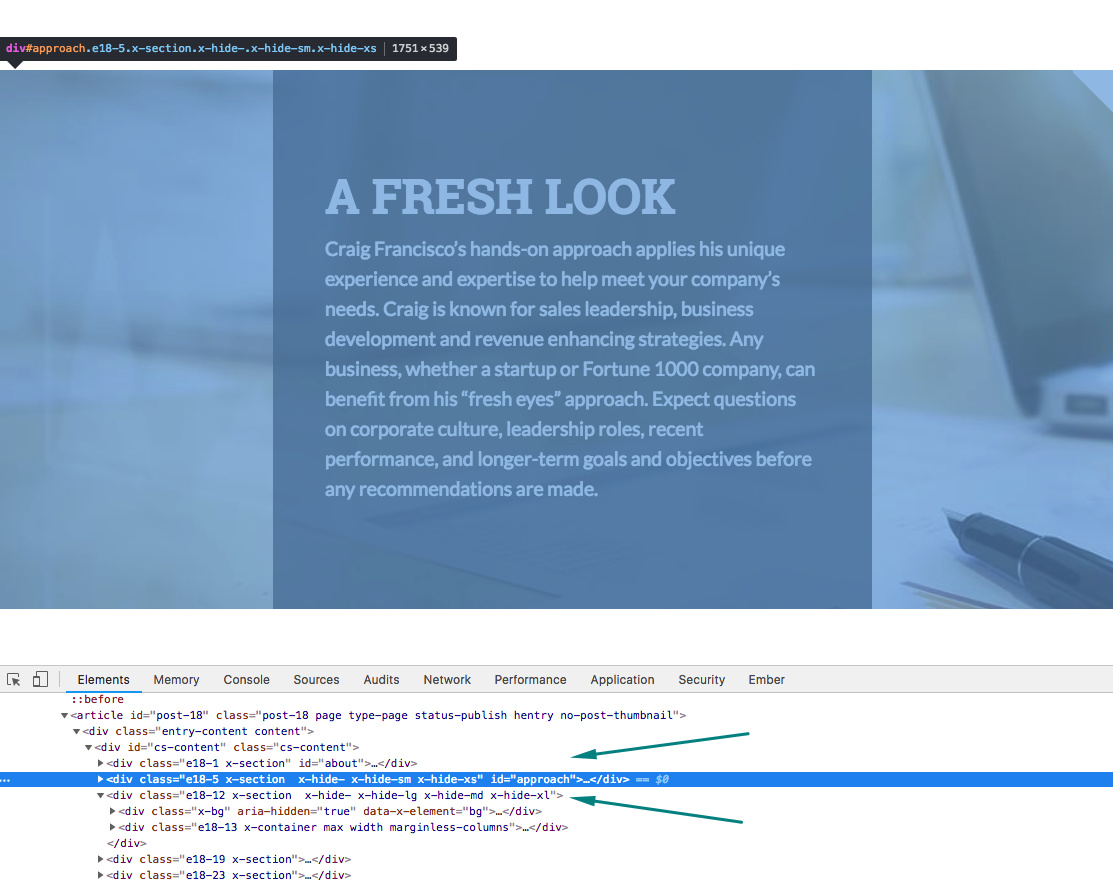
I would recommend that you merge the rows into one section with the ID “approach” because you cannot have two section with the same ID name. You may show/hide the rows instead of the section.
Hope this make sense.
Perfect sense, yes. Thank you! All set.
You’re most welcome!
This topic was automatically closed 10 days after the last reply. New replies are no longer allowed.