Link button to Content Area OFF-Canvas

Hi guys i need some help, i was able to link a button in a section to a specific “Content Area OFF-Canvas”, but i need to do this with other buttons to their respective “Content Area OFF-Canvas”, but i can’t achieve it, i tried using the “Content Area OFF-Canvas” respective class but it does not work, this is the code im using with the first button and first “Content Area OFF-Canvas”:

jQuery(function($){
$( document).on(‘click’, ‘.walk-off-canvas-trigger’, function(e) {
e.preventDefault();
$(’.x-anchor-toggle’).click();
})
});

.x-anchor-toggle class is used for all off-canvas, but each one as is personal class, ex- “e153-72 x-anchor x-anchor-toggle”, so how can i link to that specific toggle class in way to have different buttons linked to different “Content Area OFF-Canvas”??

Hello @kodii,

Thanks for posting in!

To resolve your issue, you will need to add a custom class for each of the Content Area Off Canvas and the respective button element. And then in your JS code, you will have something like this:

jQuery(function($){
  $( document).on('click', '.walk-off-canvas-trigger-1, .walk-off-canvas-trigger-2', function(e) {
    e.preventDefault();
    $('.my-caoc-1 .x-anchor-toggle, .my-caoc-2 .x-anchor-toggle').click();
  });
});

Hope this make sense.

But where do i add the custom class to the respective off-canvas element, i know i have to add a different class one to each button, but i dont see where i add the class to the off-canvas element, because when add an off-canvas element they already have a class id.

Hi @kodii,

Go to the Customize tab of the Content Area Off Canvas element (see screenshot)

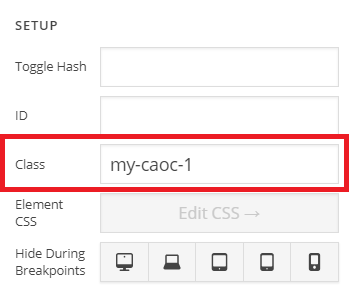
Then add a unique class in the Class field (see screenshot)

Similarly add other classes as well e.g my-caoc-2, my-caoc-3 and so on. Then you can add the following code in the Theme Options > JS:

jQuery(document).ready(function($){
	$('.walk-off-canvas-trigger-1').click(function(e){
		$('.my-caoc-1.x-anchor-toggle').click()
	});
	$('.walk-off-canvas-trigger-2').click(function(e){
		$('.my-caoc-2.x-anchor-toggle').click()
	});
	$('.walk-off-canvas-trigger-3').click(function(e){
		$('.my-caoc-3.x-anchor-toggle').click()
	});
});

Make sure you’ve given the trigger classes to your buttons as well i.e .walk-off-canvas-trigger-1

Don’t forget to clear all caches including your browser’s cache after adding the code. Let us know how this goes!

This topic was automatically closed 10 days after the last reply. New replies are no longer allowed.