How do I redirect a submenu option in my main menu to a particular section of a respective page instead of the entire page itself
Hi Karan,
Thanks for writing in! Please allow me to answer your question:
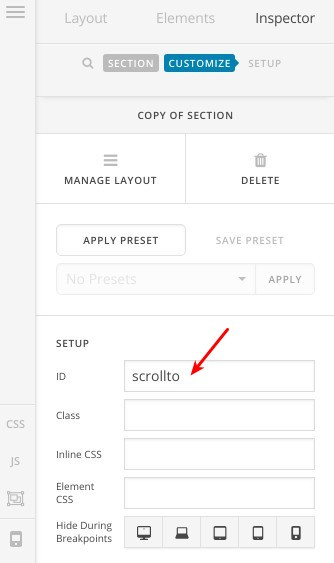
- Start with the page you want to have that particular section on, edit this section and add a custom ID to it as in this screenshot:
- Then, add a custom menu link item to your menu with a link like that:
http://your-website.com/your-page-link/#scrollto
Now, the link should navigate to this section directly.
Thanks.
Hi but how do i add a custom menu link as a sub-menu item to my main menu. For example, my main menu item is VISA and the sub-menu item is the countries of the visas we provide service
Okay, I found how to do that but my getting a page not found when trying to access the sub item. Is “scrollto” a keyword?
And the link I need to add should it be #scrollto or scrollto ?
Hi There,
The link should be #scrollto and the ID of section should be scrollto.
Regards!
Hi It works when I’m in the current page of that particular section but when I try it from the Home page and if I click the submenu of the visa application page**(it’s in my main menu)** for example, Thailand visa it does not go through. Please help me out here.
My homepage is www.tdholdays.co.in
Hey its fine i resolved it myself thanks alot!
Glad you were able to resolve it 
This topic was automatically closed 10 days after the last reply. New replies are no longer allowed.