Light box with iframe

Hi!

I have been using Modal content for a light box, but I am not able to change the size of the Modal. Only the content (iframe of it). Please see the page https://v2.ilmastokummit.fi/ and scroll down “Elämäntapatesti” and you see it.

Question 1. How I can make the modal to follow the size of the iframe? I am not able to change the size of the modal.

Question 2. Actually, I would like to have a button that opens a light box, rather than default modal icon. Is that possible?

The iframe content is a test that I would like to open from the button.

Thank you in advance
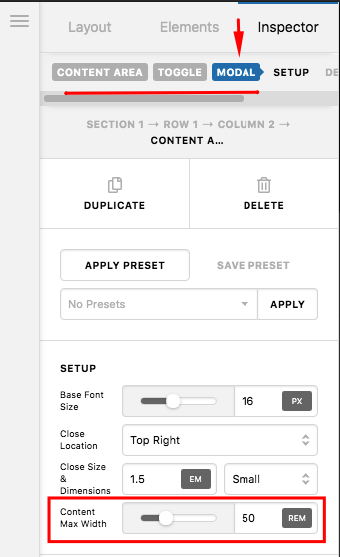
Hello @PayApi,

Thanks for writing in!

1.) Please set a fix width and height for your iframe. Do no use percentage over 100% because it will just messed up the layout.

<iframe src="https://elamantapatesti.sitra.fi/testi" width="100%" height="450px" align="middle"></iframe>

And then set the maximum modal width in the settings:

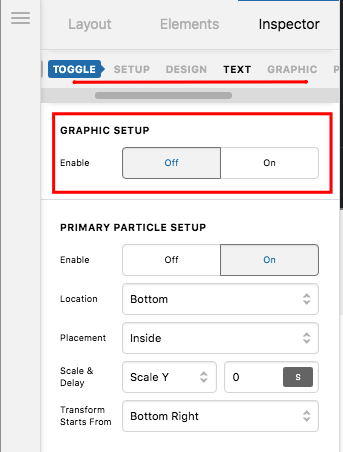
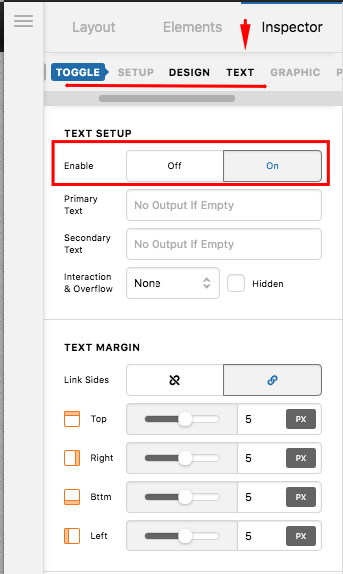
2.) If you do not want an icon and just wanted a button, please disable the graphic setup and enable the text setup.

Hope this helps.

Hi!

Thank you! I was able to fix the light box, but I have still a challenge. I am not able to remove the round element from the Toggle. How I can change that to something else?

Hello @PayApi,

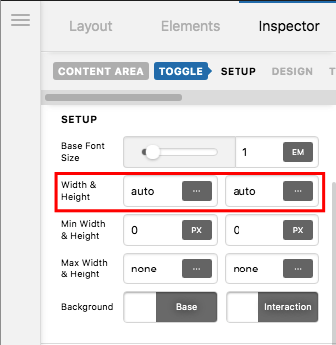
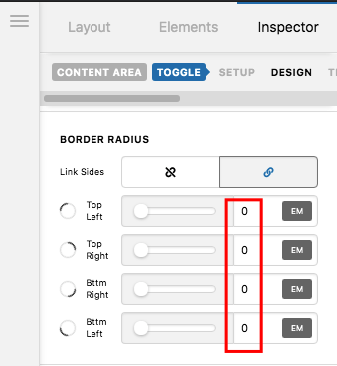
Select the content area modal element and find the “Toggle” tab. Make sure that your width and height is auto and then set the border-radius to 0 so that it will not become a circle.

Width and Height:

Border Radius:

Please let us know if this works out for you.

Thank you, of course like that :smiley:

You’re welcome, @payapi.

This topic was automatically closed 10 days after the last reply. New replies are no longer allowed.