Hello,
I have created a website and that’s just in the light and I was wondering how to add the dark mode support as well so we could use the .dark classes and when the toggle button is clicked then show the dark theme? How do I do it?
Thanks
Hello,
I have created a website and that’s just in the light and I was wondering how to add the dark mode support as well so we could use the .dark classes and when the toggle button is clicked then show the dark theme? How do I do it?
Thanks
Hello @abdurrehman,
Thanks for writing to us.
The features you are requesting would require custom development. I recommend reaching out to a developer who can assist you with your specific needs. Alternatively, you may consider subscribing to One, where customization questions are supported and answered. Please note that providing custom development support is beyond the scope of our standard support services.
Thanks for understanding
I know that but you didn’t even bother to tell how this could be done with it as the Pro is ultimate theme as you claim but it appears that’s just trap and what actually is the One, a custom dev platform. @christian and other guys are always helpful at least guide the way to that, how it can be done.
Hey @abdurrehman,
You would need to add a toggle in your header, custom CSS and a little bit of Javascript code. Check out this example:
With the modern browser, there are ways to apply light and dark mode as well. This article should be able to help you understand if you may want to apply it to your site.
If you want to get more into this, TailwindCSS can be of use. Be aware that this would need to have an intermediate or advanced coding skills.
Best Regards.
Hi,
Using the JavaScript I could add the toggle button and trigger the class .dark to the HTML document but the thing that I didn’t get about adding the bg or other things for example cornerstore has the option to add the background but how to trigger for the dark for example when it has the dark class then how that would show? like instead of light show the dark one? TBH, with the tailwind is simple and straightforward but I’m having hard time with Pro as it’s the page builder.
Hi @abdurrehman,
It is not about adding a Toggle Button — you will need to use JavaScript to add the appropriate class (dark or light) to the body element. This will change the colors of the child elements based on the parent hierarchy class.
The following thread explains this process in more detail:
If you encounter any issues during implementation, feel free to reach out to us for further assistance.
Please note that custom coding is beyond the scope of Theme Support, and the code provided in the above thread is only an example to get you started.
Thanks
Could you please create an example of that over here to have a look? I’ve shared the credentials above.
Hi @abdurrehman ,
Unfortunately, creating examples falls under customization, which is beyond the scope of Theme Support . However, if you encounter any issues while implementing it, please let us know — we’re here to assist you.
Thanks
Have a look at the page and when it’s clicked then how could we swap the icon with moon? and how to trigger the dark class that could show the styles on the page’s elements?
Hello @abdurrehman,
The prefers-color-scheme media query in CSS may not be fully supported in this latest version. Our developers may release full support when we roll out Pro 6.8. At the moment, you can use the body class method as suggested here:
I have also created a demo to demonstrate this. You can check your header. Be advised that custom coding is beyond the scope of our Support. Both the JS and CSS codes in your header as for demonstration purposes only.
Best Regards.
When the 6.8 is coming out? I tested that but why the icon changes on hover instead of click?
Hi @abdurrehman,
The Secondary Icon is set for the Button element, and it appears while hovering over the button.
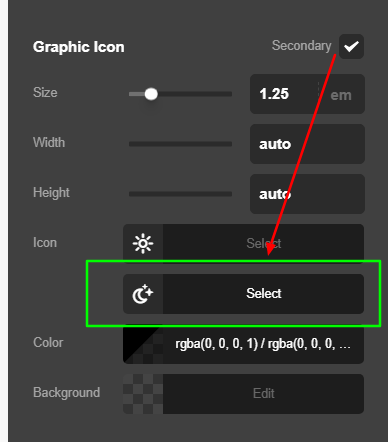
Thanks
But how to show it on click instead of hover?
Hey @abdurrehman,
That would require another custom Javascript coding. As my colleagues already mentioned, it is beyond the scope of our support.
It would be best that you integrate the custom button that was suggested in Codepen. You can do so by adding the code in a Raw element.
Pro is the ultimate theme because of it’s unique features and you can build different website styles with ease unlike other builders. However, this does not mean that it has everything. No theme nor builder in the market offers that.
If you need recommendations on extending the theme, please consider subscribing to our One service.
Thank you.
I’m already regretting with the pro unlimited as very basic things requires custom code to achieve that so I’ll better create the site using tailwindcss instead of the One service. It’s not what it’s advertised and this feature is one of the core of today’s website and it can’t do it.
Hi @abdurrehman,
I’m really sorry to hear that you’re feeling this way, and I completely understand your point. Some features may require custom code depending on the level of flexibility needed, and in those cases, our options are limited from the support side.
If you need any guidance or have questions while implementing it, feel free to let us know — we’re here to help as much as we can.
Thanks.
Thanks for that, you could help and had helped above but some aren’t just wiling to. I had asked but he said it was a custom and didn’t help that’s why I said that which seems true.
welcome for what? you misunderstood it.