"Leave A Comment" Link is Broken

Hi Support Team,

The “Leave a comment” link on every post such as https://www.tips4gamers.com/a-plague-tale-innocence-experience-crafting-alchemy-and-more-in-the-gameplay-overview-trailer/. It takes me nowhere. It adds to the end of the URL “#respond” but nothing ever happens.

I have set the display to none via CSS but I will make sure to deactivate for you guys.

I am using Disqus now but the comments were not turned on at all even though they were turned on in the “Discussion” tab and in each individual post. Not sure what was going on there so I activated the Disqus plugin for a quick fix.

Thanks and regards,

Josh
Hi Josh,

Those are for default wordpress comments link. Since you are using disqus it is not working. Link should be change. See the code suggested on this thread. It’s the function x_change_comment_link

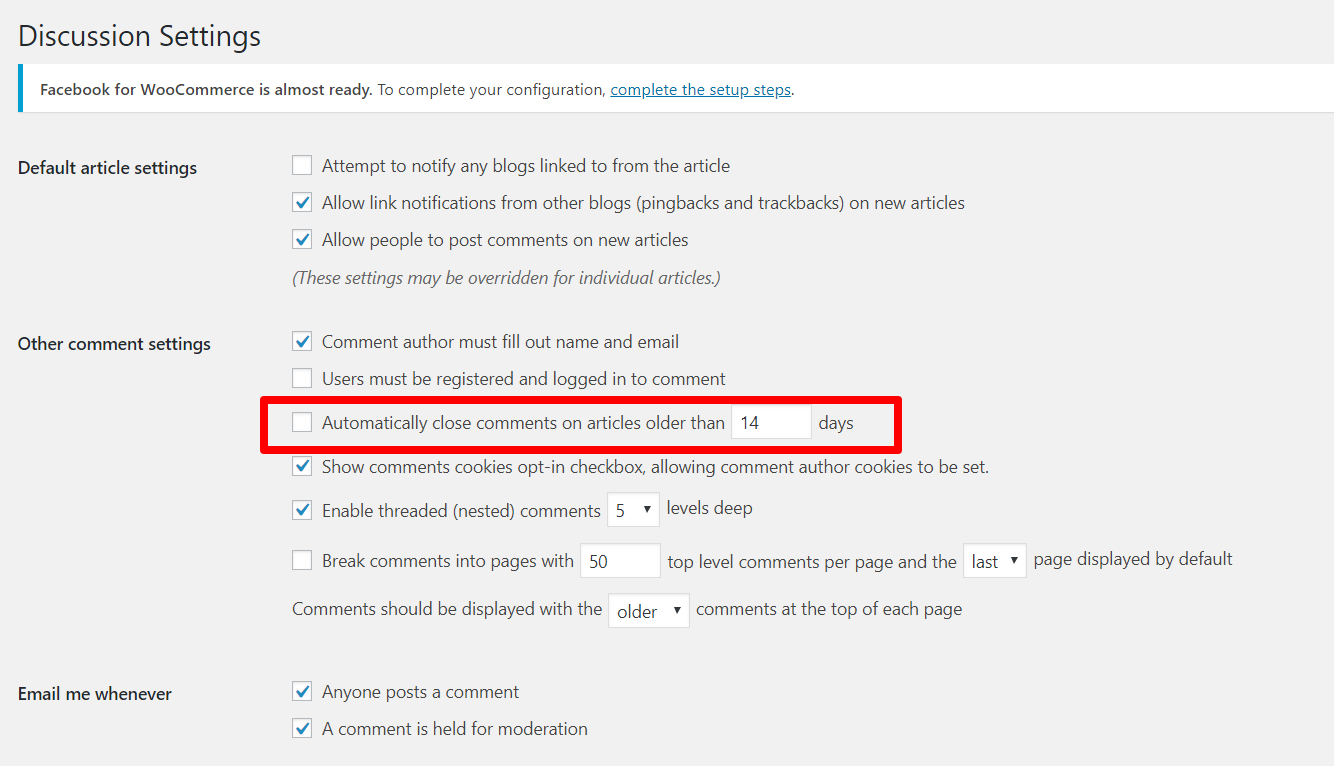
Please look on your Discussion Settings. Make sure the following settings is not turned on

In case you don’t intend to use discqus, please ignore the leave comment issue. Once you switch back to default wordpress comment system, it will be work as intended.

Hope this helps.

1 Like

Hi Lely,

Thank you for that! It indeed fixed the Leave a Comment issue. I don’t believe I am going to us WordPress comments anymore. That issue with WP comments not showing up is not fixed. If I change my mind and I cannot fix the issue I will contact you guys! Thank you again for your help!

Thanks and regards,

Josh

You are most welcome, Josh. :slight_smile:

This topic was automatically closed 10 days after the last reply. New replies are no longer allowed.