Layout of items on the search page

I know I’m just missing something but is there a way to change the layout of site search appearance…say a tiled layout with the featured image and some text on it or below it?
Where do I change the appearance of search? I looked in the “X Customize” area in Appearance but can’t find it.
Looking to add a set of portfolio items that are displayed as a sortable comprehensive exercise library similar to what is on the site but actually have them link to Portfolio items instead of a gallery as here. https://julielohre.com/exercise-library/

Knowing that when I do that people will likely use the search feature for an exercise they’re looking for, I want to make sure it looks right when they search with a photo. Currently it’s set to just return a title and some text from the article. (Not even sure I remember how I set that option at this point - I’m just smart enough to be dangerous! :smiley:)
Thanks, Rick Lohre

Hi there,

Unfortunately, our theme does not have that functionality out of the box. You will need to have a great amount of customisation to have the same results for the search page. This is outside of our support scope and we will not be able to implement such a feature for you. But we will be glad to add this as a feature request.

Our Development Team will look at the request and if they see it fit they will implement a feature. We will not be able to give you a concrete answer if it is going to be implemented or not or any ETA regarding this.

Thank you for your understanding.

No worries.
Silly question I know, but as I said before I’m just smart enough to be dangerous, do you know what I have done to turn my search results to only allow text? I know in the theme it self it is designed to return an image above the text. Any help there would be greatly appreciated

Hi there,

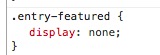
I found a code which is causing the issue:

Please check the customization you have done and delete that code which is causing the images not to show.

Thank you.

Thank you so very much. I will look and remove it. I do have a listing of the CSS customizations I made…I just forgot what each one does :persevere:

You’re most welcome!

Is there a way to determine if modifications were made outside of the GLOBAL CSS and ADDITIONAL CSS?
Also, what is the difference between the two above. I know I’ve added quite a bit to the GLOBAL and one thing to the ADDITIONAL…but can’t for the life of me figure out why to use one or the other?

Hello There,

What we do to determine the modification is to inspect the element using the Google Dev tools. To know more about this, please check this out: https://developers.google.com/web/tools/chrome-devtools/inspect-styles/

Please understand the hierarchy of the styles applied to a page. This is the order:

  • Stack style.css
  • Child theme’s style.css
  • WordPress Additional CSS
  • Theme Option’s custom css
  • Cornerstone’s page/post custom css

Hope this helps.

This topic was automatically closed 10 days after the last reply. New replies are no longer allowed.